This article will show you how to connect/disconnect a Bluetooth device to a Chromebook.
Connecting (Pairing)
1. First, check if your Chromebook works with Bluetooth. Click on the time and date on your toolbar. If you see a Bluetooth icon, your Chromebook works with Bluetooth devices. If it says Bluetooth Disabled, select that and toggle Enable Bluetooth.

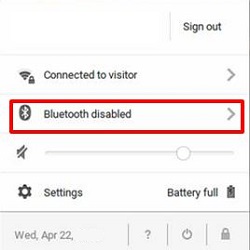
2. Click the Bluetooth device you wish to connect to and follow the onscreen instructions to finish connecting.

3. To check if your accessory is connected, look under Paired devices.
Disconnecting (Unpairing)
1. Click on the time at the bottom right of your screen to get some additional options to appear.

2. Click the Bluetooth Icon.

3. Click the Gear icon.

4. Click the three vertical dots located to the right of the device you want to unpair.

5. Click Remove from list.

The Bluetooth device is no longer paired with the Chromebook.
