
Change RGB fan on PowerSpec G728


How can I change the RGB of the fans of my PowerSpec G728 computer? I've tried installing Gigabyte Control Center but only my RAM shows up and not the fans. I've also tried installing and uninstalling (one by one) other RGB software like L Connect 3, RGB Fusion, Signal RGB, Armoury Crate, etc.
Comments
-
Did you ever figure this out? Just got one and want to know too!
-
@aceofblue nope :( i have yet to call them but from what i've read on reddit- the newest gigabyte update bricked the rgbs and i'm too scared to mess with the mobo since i'm completely new to pcs
-
I previously reached out to support through the website, but unfortunately the issue was not resolved. The virtual assistant first recommended using Polychrome RGB, which does not work with my Gigabyte motherboard. I was then connected with a support agent who asked whether Gigabyte Control Center would work; I explained that only the RAM RGB could be changed through it and none of the other lighting.
I was then instructed to hold down the “M” button on top of the case for 10 seconds to turn the RGB off, but this had no effect. After that, I was advised to download L-Connect 3. I downloaded and installed it twice, but the software still would not work or detect the lighting.
Support then told me I would need to bring my PC into the store for further diagnosis. When I brought it in, I was informed that they would have to keep it for up to 48 hours to diagnose the issue. I asked why a prebuilt Micro Center PC did not come with any software to control or disable RGB lighting, but no clear answer was given—only suggestions to try additional programs.
I ultimately chose not to leave my PC there at that time, but I may need to bring it back unless Micro Center is able to provide a fix without another in-person visit.
-
I just bought mine two days ago and have been doing everything I can to figure out how to turn these fan lights off. I also can only turn off the RAM lights. Tried holding the M button for 10 seconds, with no luck. I updated through Gigabyte Control Center with no luck either.
-
I thought I was going crazy thinking my PC was the only one who had issues. It seems like this is an ongoing issue with most, if not all of their units. I wish this can be fixed because I love being able to customize my lighting and it sucks being limited to 8 colors. The PC itself is genuinely pretty to look at too.
-
I managed to fix mine after chatting with someone through support. Here's what they said:
There is a button on the top of the computer that has two halves to it. One side is labelled M and the other side is named C. One the M side if you press it 7 times it will take you through the patterns of the RGB lights, on the 8th press it will sync it to the motherboard. If you were to press it 8 times and hold for 3 seconds, it will give a command to turn off the RGB lights. Let me know if that helps or if you have any questions.
They all sent this super tiny image:
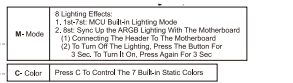
Hope this helps!
-
Thank you for this!!I went into the Gigabyte Control Center and turned off the RGB and when cycling through the M button you will notice when it shuts off the RGB. You shouldn’t have to hold down the button at all. 🙌
-
Thanks! It worked as well! I was able to finally change the lights on my case fans as well. Might have something to do with the new GCC update that I installed.
-
I have the preinstalled GBCC on a G728 system first powered up 12/29/25. In the GBCC app level 24.10.28.01 I have 'Dynamic Lighting' set to on. Clicking the Dynamic Lighting link button takes me to the personalization settings in WIndows 11. In Those settings both slider switches for 'Dynamic Lighting' and 'Compatible Apps In Foreground' are set to on. I cycled through the M button choices until the fan lights turned off. I rebooted and the RGB stuff came back on, but when Windows was finished booting they reverted to their off state. So I think I'm satisfied. I'd rather have documentation that sucks for software that works, than great documentation for software that doesn't work. So I think I'm satisfied. But these PowerSpec systems certainly put you through some exploration.
-
Thank you so much!!


Leave a Comment
Categories
- All Categories
- 1 The Blog
- 1 What's Trending
- 7.9K The Community
- 3.2K General Discussion
- 143 New Members
- 866 Consumer Tech
- 231 Prebuilt PCs and Laptops
- 167 Software
- 33 Audio/Visual
- 54 Networking & Security
- 4 Home Automation
- 5 Digital Photography
- 14 Content Creators
- 30 Hobby Boards & Projects
- 83 3D Printing
- 83 Retro Arcade/Gaming
- 61 All Other Tech
- 416 PowerSpec
- 2.6K Store Information and Policy
- 150 Off Topic
- 60 Community Ideas & Feedback
- 614 Your Completed Builds
- 4K Build-Your-Own PC
- 2.9K Help Choosing Parts
- 328 Graphics Cards
- 335 CPUs, Memory, and Motherboards
- 145 Cases and Power Supplies
- 54 Air and Liquid Cooling
- 49 Monitors and Displays
- 93 Peripherals
- 68 All Other Parts
- 65 Featured Categories
We love seeing what our customers build
Submit photos and a description of your PC to our build showcase
Submit NowLooking for a little inspiration?
See other custom PC builds and get some ideas for what can be done
View Build ShowcaseSAME DAY CUSTOM BUILD SERVICE
If You Can Dream it, We Can Build it.

Services starting at $149.99