
PowerSpec G911 - Request For Updated BIOS & BSOD Question


Hey PowerSpec,
1. Is there an updated BIOS for the G911? I haven't seen an update for it in a while. I have been using the MSI BIOS update but I just read about that PowerSpec computers are not supposed to be using that?
2. I've also been getting the DRIVER POWER STATE FAILURE BSOD since I've had the computer. I'll post a link below so you can get a better look at what I've been experiencing. I had someone look at my dump file and they said it's something connected to the SATA drive that's causing this error? I have yet to take the PC apart so I wouldn't know.
https://forums.tomshardware.com/threads/driver_power_state_failure-bsod.3892274/
Comments
-
Working on 2A95 now. You can download the BIOS for the G913/914, it's the same platform:
Did you attach SATA drives to the system?
-
Hey @PowerSpec_MikeW,
Thanks for the quick reply! I'll download and apply the BIOS update when I get back home.
No, I have not attached SATA drives to the system. I never opened the system up not even once. Just bought and played as is. -
Also @PowerSpec_MikeW,
When I downloaded and put the BIOS update for the G913/G914 on my USB drive, the BIOS file wasn't showing up in the BIOS when I went to go flash it. You sure it supports the G911 or did I mess up by installing the MSI version? -
Has to be in advanced flash mode. Control + Alt + T.
-
Hey @PowerSpec_MikeW,
I’ll try the advanced flash but back to the BSOD error. When they took a look at my dump file, they said it’s my SATA Controller and could be something in my SATA ports. When I opened it, there’s nothing plugged in any of the four ports. I don’t understand how it’s triggering a BSOD when there’s nothing there. Is there a way to disable them?
-
Download the first BIOS file listed, I'm trying to our web team to delete the second one.
I need what's in your event viewer, administrative events, right before the crash.
-
Hey @PowerSpec_MikeW,
I'll post a link to my most recent BSODs along with the SysnativeFileCollection. There's one BSOD file in the first link and two updated files on the second. At first it was a BSOD for the SATA drives, then it was a BSOD for the WiFi Lan Driver but all facing the same "blocked IRP - power transition" error. Do you think it's the PSU or MOBO? I haven't had the PC for more than 5 months and had the issue since I got it. I've been trying to diagnose and fix it myself but nothing is working. Everyone keep saying "update drivers, new BIOs, etc." and I've been doing that and nothing works.
https://www.mediafire.com/file/esh9mng6vn89g4l/012626-13625-01.rar/file
https://www.mediafire.com/file/mi5u938h55e8sw3/SysnativeFileCollectionApp.zip/file
The people on Toms Hardware are resorting to a possible PSU problem. If you want to check the thread to them diagnosing the dump files then the link will be below.https://forums.tomshardware.com/threads/driver_power_state_failure-bsod.3892274/
Also, after gaming for a period of time. My CPU temp is stuck at one number and my fans continue to spin at that speed, even when the game is closed. If I try to start the game again, it remains frozen in the task manager until the computer is restarted.
-
Also @PowerSpec_MikeW ,
I'm looking at HWMonitor app and all of my temps are stuck at the same numbers. I tried to launch ARC Radiers after noticing the temp on the CPU remained the same and the game is now frozen and I can't close it out in Task Manager at all. The temps remain the same until restart and it won't let me launch games until it's restarted.
Here's a link to LiveKernelReports folder if you need to take a deeper look.
https://www.mediafire.com/file/wuatacr43c0amad/LiveKernelReports.zip/file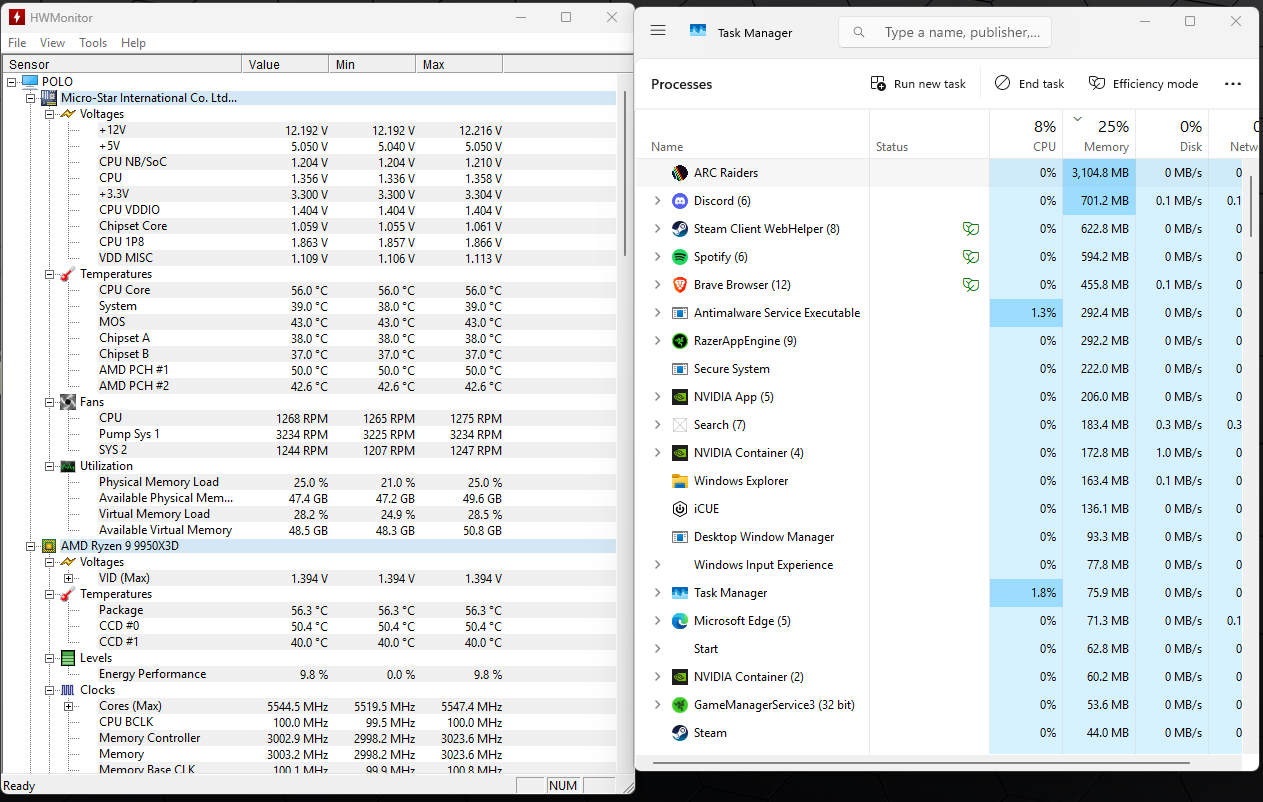
-
Sounds more a like a board issue with either faulty sensors or a controller issue. I buy an SDK from HWINFO64 that's coded into the QC software I've written and that runs on all of our systems at the factory. But that's speculation, it can be difficult to narrow down these types of intermittent issues.


Leave a Comment
Categories
- All Categories
- 1 The Blog
- 1 What's Trending
- 8K The Community
- 3.2K General Discussion
- 145 New Members
- 872 Consumer Tech
- 233 Prebuilt PCs and Laptops
- 168 Software
- 33 Audio/Visual
- 54 Networking & Security
- 4 Home Automation
- 5 Digital Photography
- 14 Content Creators
- 30 Hobby Boards & Projects
- 84 3D Printing
- 83 Retro Arcade/Gaming
- 62 All Other Tech
- 429 PowerSpec
- 2.6K Store Information and Policy
- 150 Off Topic
- 61 Community Ideas & Feedback
- 616 Your Completed Builds
- 4K Build-Your-Own PC
- 2.9K Help Choosing Parts
- 328 Graphics Cards
- 334 CPUs, Memory, and Motherboards
- 145 Cases and Power Supplies
- 54 Air and Liquid Cooling
- 49 Monitors and Displays
- 93 Peripherals
- 69 All Other Parts
- 65 Featured Categories
We love seeing what our customers build
Submit photos and a description of your PC to our build showcase
Submit NowLooking for a little inspiration?
See other custom PC builds and get some ideas for what can be done
View Build ShowcaseSAME DAY CUSTOM BUILD SERVICE
If You Can Dream it, We Can Build it.

Services starting at $149.99