
PowerSpec BIOS Requests and Questions - AMD
Comments
-
Incremental increases at a hundredth of a volt. I'd go up to 0.95 on VDDP. Don't go over 1.30V on VSOC and 1.40 on VDDIO.
-
Most likely a lower VDDP voltage. Screenshot Zentimings with EXPO on please.
-
We recommend 4.00 from ASRock, we're not providing driver support on that model at this point.
-
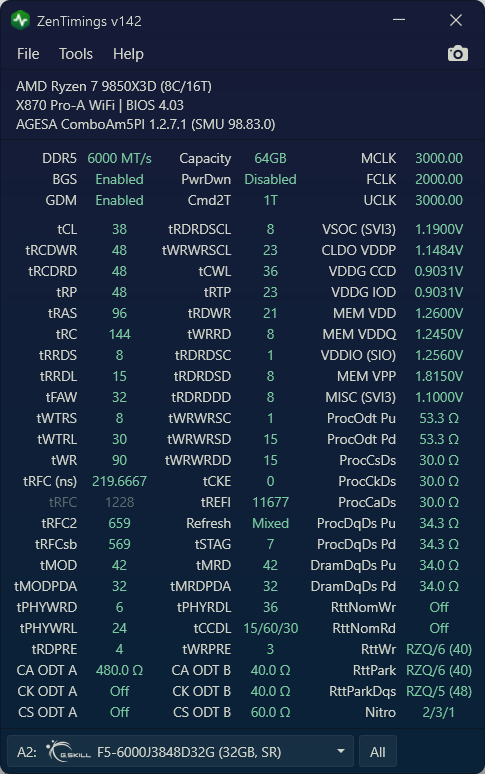
Here’s ZenTimings with EXPO on, running the stable BIOS 4.03 (stock ASRock, not MS02). CLDO VDDP reads 1.148V. On 4.60 it crashed even with EXPO off. Is there a VDDP value I should set manually on 4.60, or a newer PowerSpec BIOS build?
-
Go 0.90-0.95V on the VDDP. You can up the VSOC to 1.25V, but start with just VDDP. Run memtestx86, let me know which tests fail.
-
Hello PowerSpec Team,
I'm requesting assistance with recurring graphics crashes on my PowerSpec B244 desktop.
System specifications:
- Model: PowerSpec B244
- Motherboard: ASRock A320M-HDV R4.0
- Processor: AMD Ryzen 5 3400G
- Graphics: Integrated Radeon RX Vega 11
- BIOS: P3.70 (January 15, 2020)
- RAM: 8 GB DDR4
- Operating System: Windows 11 Pro 26H2
- Graphics Driver: AMD Adrenalin 26.1.1 (31.0.21924.61)
Problem:
My computer experiences intermittent graphics-driver timeouts, complete system freezes, and blue-screen crashes, particularly while playing Clone Hero.
Windows Reliability Monitor has recorded LiveKernelEvent 117 errors involving
amdkmdag.sys.WinDbg also identified an AMD-related blue-screen crash with bugcheck
0xA0000001.I've performed troubleshooting, including checking the GPU driver, running Windows Memory Diagnostic (no errors detected), and testing with a clean boot.
AMD Adrenalin 26.1.1 improved Clone Hero performance to approximately 60 FPS, but the crashes have continued.
BIOS questions:
I found an older Micro Center community discussion mentioning a possible BIOS issue affecting some PowerSpec B244/B245 systems with the Ryzen 5 3400G and BIOS P3.70.
The discussion mentioned BIOS 3.30 and a custom BIOS fix.
Micro Center customer support informed me that P3.70 is the latest BIOS they currently provide and mentioned a file labeled
A32HDV43.70F, but recommended asking the PowerSpec engineers for specific compatibility guidance.Could you please clarify:
- Does my PowerSpec B244 configuration match the previously reported BIOS issue?
- Was BIOS 3.30 or a custom BIOS developed to address this issue?
- Which BIOS version would you recommend for my exact system?
- If a BIOS change is appropriate, could you provide the correct verified firmware file and safe installation instructions?
I have not attempted to update or downgrade my BIOS because I want to avoid installing incompatible firmware.
Thank you for your assistance!
-
This board is 5 years old, we're not supporting driver updates at this point. I would test the latest ASRock BIOS and let me know what you're seeing and we can go from there. I recall this case vaguely, but I believe it was from 2020.
-
Thank you for your response!
I checked ASRock's official BIOS page for the A320M-HDV R4.0 and found BIOS 10.50 and the newer 10.62 beta.
ASRock also mentions that BIOS 7.00 is required before upgrading to those versions and warns that downgrading may not be possible afterward.
Before proceeding, could you please confirm:
- Is the retail ASRock BIOS compatible with the PowerSpec B244's original P3.70 firmware and Ryzen 5 3400G (Picasso)?
- Would you recommend BIOS 10.50 or 10.62 beta for my graphics stability issue?
- What exact BIOS upgrade sequence should I follow from PowerSpec P3.70?
I want to make sure I don't accidentally render the motherboard unusable.
Thank you!
-
Is this still the go to place to get update BIOS for G760 or should I just use the one I got from ASUS? Is there something specific to the powerspec system to be concerned over (no rollback it seems for the latest from sept 2026)
-
It's up to you. I have BIOS updates for the board and I'm actually working on the latest at work right now. So we'll change a few things with some exceptions. Generally disable the IGP, we enable PXE boot for imaging. We verify secure boot is enabled with keys loaded. Other than that, it's just SMBIOS data. We do test and push driver sets. If you flash the ASUS BIOS you won't get what we tested, rather what ASUS did if they post driver sets to Windows Update. Also, in the rare event that there's a significant system issue we can't target a fix at your system. You'd need to potentially download it manually.
-
Just bought a
PowerSpec G541 Gaming PCAMD Ryzen 5 7500X3D 4.0GHz Processor; AMD Radeon RX 9070 XT
Can I get a link to download the latest bios heard there was issues going on want to make sure it’s updated thanks. -
Hey @PowerSpec_MikeW, I brought my g730 this AM to run a quick diagnostic under warranty with you guys.Everything checked out no issues.
when I brought it home, decided to update the bios to the F12c version. It went through.
tried to boot with x3d turbo and EXPO 1, had to cleared CMOS. Tried it again with just EXPO 1, didnt work.
last try I did with XMP 1, didnt work either but after clearing CMOS and reboot I simply get a black screen with a dash ln the top left corner on the monitor and it just stays there. I tried to restart normally but monitor wouldnt boot so had to clear CMOS again and I am now back to the blank screen and the dash
should I bring it back to you guys in the morning? i dont think I can even get into BIOS anymore lol
(nevermind, I unplugged my keyboard, mouse and it booted into windows)i guess my only issue now is no matter which profile I picked XMP OR EXPO the pc would simply not boot and have to clear cmos every time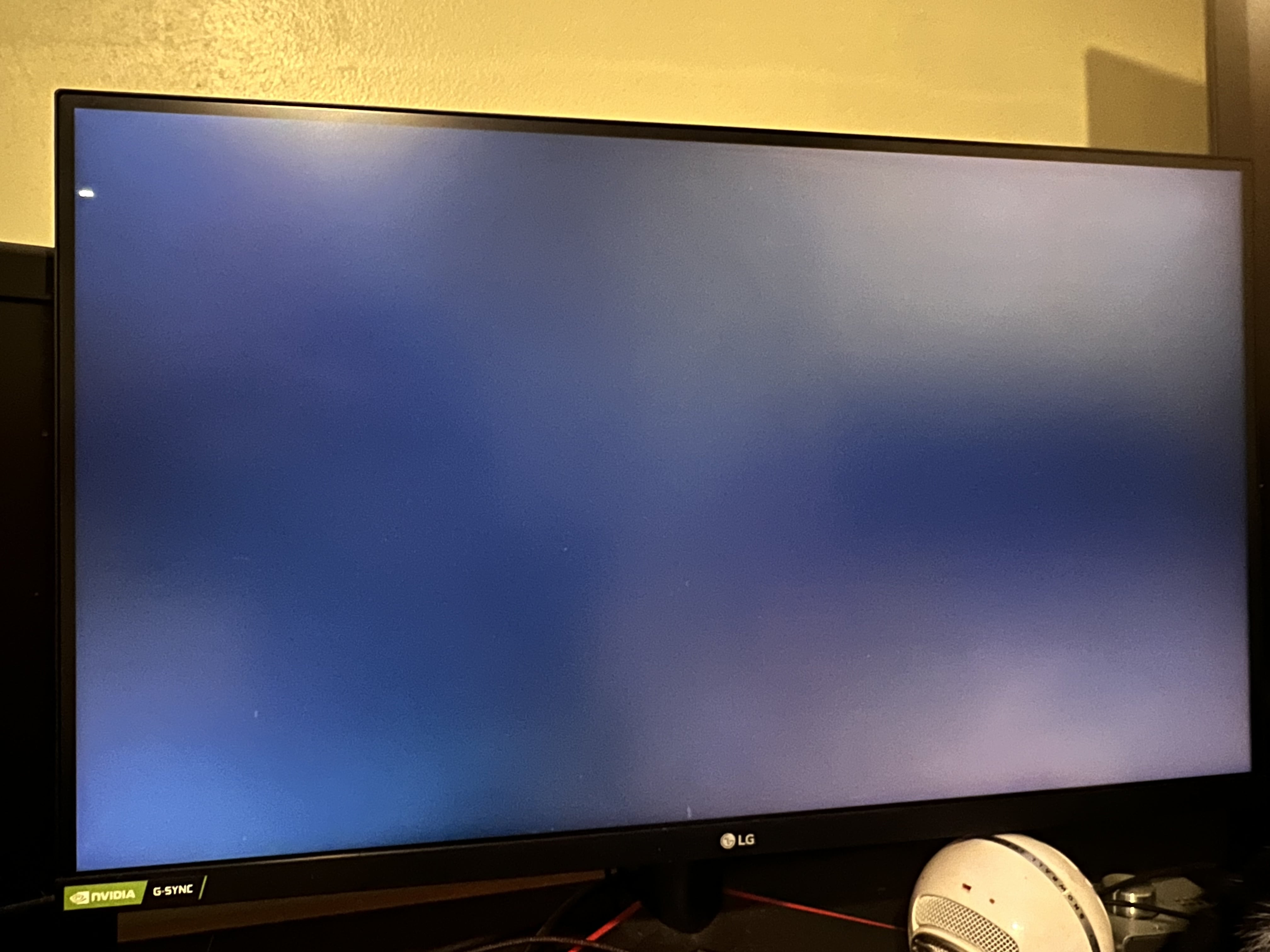
-
Is it possible for me to rollback to f7 bios for the g730. The XMP was working on that version
-
Hi PowerSpec team,Could I please get the latest validated BIOS update for my PowerSpec G756? I'm currently experiencing a random sleep/wake-up issue in Windows 11 and would like to update to the newest build with the latest AGESA and sleep/Wake-on-LAN fixes.
- System Model: PowerSpec G756
- Motherboard: MSI PRO X870-P WIFI (MS-7E47)
- Processor: AMD Ryzen 7 9800X3D
- Current BIOS Version:
E7E47AM70.1A04(05/07/2025)
Thank you!
-
-
-
-
Hi Mike,
@PowerSpec_MikeW thanks for the quick reply! It looks like the attached file was
E7E70AM70.2A05, which M-Flash doesn't show because my motherboard is the PRO X870-P WIFI (MS-7E47/E7E47AM70). Could you please attach the latestE7E47AM70file instead? Thanks!Best,
SaiSaiCi
-
-
Sorry, you have to use Advanced flash mode. Control + Alt + T from the BIOS. When we customize the BIOS, MSI changes the model.
-
Hi Mike,
@PowerSpec_MikeW
Ctrl + Alt + Tin Click BIOS X rebooted into the standard M-Flash screen and still hidE7E70AM70.2A05on myC:drive. On Click BIOS X (MS-7E47), do I need to use a FAT32 USB drive withCtrl + Alt + T, a different key combo, or the rear Flash BIOS Button withMSI.ROM? Thanks. -
What BIOS version are you on? We did have some versions that were bugged when flashing certain version numbers. Mainly the 2A42-2A52 retail equivalents.
Edit: I just sorted through my notes on this. We had to flash from the OS with AFUWIN. I would flash the retail BIOS first, latest and then rollback if you want our custom BIOS.
-
Thanks for checking your notes, Mike! I'm currently on
E7E47AM70.1A04(05/07/2025). Could you please attach theAFUWINpackage / batch script (or the exact command flags you used) so I can flashE7E70AM70.2A05cleanly from inside Windows? Thanks again! -
AFUWIN is a licensed tool, let me see if I can redistribute that.
Edit: I cannot, but I am working on a new BIOS. It'll be a derivative of 1A93. Should be ready in a few days.
-
Thank you for the information! I'm looking forward to the new BIOS release. Will I be able to update it regularly through the BIOS? I appreciate the time you've taken to do this, thanks!
-
It'll require the advanced flash mode.
-
Hello, I've been experiencing rotating BSOD kernel errors for about a week. I am looking to flash BIOS to the latest to see if that fixes the errors.
System specifications:
- Model: PowerSpec G535
- Motherboard: MSI PRO B850M-VC WIFI6E (MS-7E71)
- Processor: AMD Ryzen 5 7500X3D
- Graphics: AMD Radeon RX 9070XT
- BIOS: E7E71AM70 v1.A01 (July 25, 2025)
- RAM: 32GB DDR5
- Operating System: Windows 11 Home 10.0.26200
- Graphics Driver: AMD Adrenalin 26.10.1 (32.0.31044.16)
Troubleshooting:
The BSODs usually occur during gaming, but have also happened while watching Youtube. There have been numerous errors:
IRQL_NOT_LESS_OR_EQUAL,PAGE_FAULT_IN_NONPAGED_AREA,DPC_WATCHDOG_VIOLATION,KMODE_EXCEPTION_NOT_HANDLED,HYPERVISOR_ERROR. I've owned the PC for about 3 months with no issue, and these errors started suddenly last week and occur frequently. It seems like they started after a display driver update.
To troubleshoot:- Updated my Chipset and graphics drivers to latest.
- I've run MemTest86 to verify that there are no issues with the RAM.
- I've run OCCT power test to verify that the system can handle max load for sustained periods.
- Disabled A-XMP and EXPO profiles.
- Disabled Global C-State Control.
- Set Power Supply Idle Control to Typical Current Idle.
- Set PCIe Link State Power Management to Off.
My thought is that there is some incompatibility with the older BIOS version and the latest drivers. I guess there could be an issue with the board itself but wanted to try updating BIOS before replacing hardware.
-
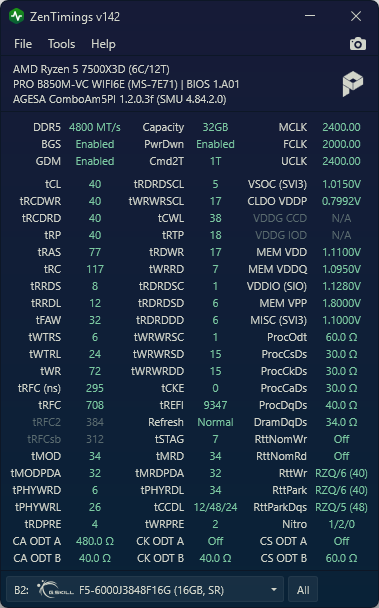
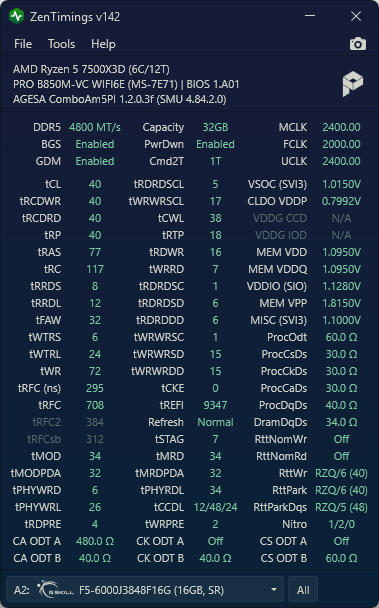
They seem random, but he Hypervisor warning points towards the CPU. Please run Zentimings and post a screenshot.
-
-
Go ahead and enable EXPO. Drop your FCLK to 1800MHz, set your VDDP to 0.95V. Do both of these after enabling EXPO. Then test for stability. If it crashes, let me know the BSOD and post another Zentiming screenshot with EXPO enabled.


Leave a Comment
Categories
- All Categories
- 1 The Blog
- 1 What's Trending
- 8.2K The Community
- 3.3K General Discussion
- 153 New Members
- 896 Consumer Tech
- 248 Prebuilt PCs and Laptops
- 171 Software
- 33 Audio/Visual
- 54 Networking & Security
- 4 Home Automation
- 5 Digital Photography
- 14 Content Creators
- 30 Hobby Boards & Projects
- 85 3D Printing
- 84 Retro Arcade/Gaming
- 64 All Other Tech
- 520 PowerSpec
- 2.7K Store Information and Policy
- 156 Off Topic
- 70 Community Ideas & Feedback
- 620 Your Completed Builds
- 4.1K Build-Your-Own PC
- 3K Help Choosing Parts
- 329 Graphics Cards
- 339 CPUs, Memory, and Motherboards
- 146 Cases and Power Supplies
- 54 Air and Liquid Cooling
- 51 Monitors and Displays
- 94 Peripherals
- 71 All Other Parts
- 65 Featured Categories
We love seeing what our customers build
Submit photos and a description of your PC to our build showcase
Submit NowLooking for a little inspiration?
See other custom PC builds and get some ideas for what can be done
View Build ShowcaseSAME DAY CUSTOM BUILD SERVICE
If You Can Dream it, We Can Build it.
Services starting at $149.99