
Device Driver for G913: questions, issues, and solutions


With the large number of posts I'm seeing across numerous forums, for Device drivers people can't find, I'm starting a topic for requesting and posting driver issues that have proven difficult to resolve.
So whether you're having issues with a system-build, a device you've upgraded or added to your system, or have recently reinstalled your OS (operating system), post here where everyone can collectively learn from Device driver issues you're having. Please include the system and/or device information, where you've searched, and/or the solutions you found that resolved the Device driver issue. That said…
After some digging and DMs, I'm learning that MS is/has been distributing drivers in their forced updates, that are now being specifically written to not be backward compatible (i.e. will not work on Windows 10 (W10) on older operating systems, in an attempt to force adoption of W11. That's also why you will find some drivers listed as W10/W11, as some companies push-back against MS to prevent alienating their loyal customers.
The most common Device Driver issues I've seen are for: ethernet LAN controllers, USB controllers, and Wifi 6/6e/7 drivers.
.
The first one I will post, is for the USB4 driver for the MSI MAG X870E Tomahawk motherboard (7E59) 2.0
Comments
-
(Edit: because I had to wait more than a week to post images and links, I've resolved the USB4 driver issue)
After an operating system clean install, I had multiple devices showing the following:
Driver Provider: Unknown
Driver Date: Not available
Driver Version: Not available
Digital Signer: Not digitally signed
One thing that can make this difficult, is Windows may rename the Device to a generic name, and moves it from the Device category where it gives you an idea of where to start (e.g. Network adapters), to a new Category that Windows creates with no indication of what the Device driver is for.
First, make a system restore point, in case any of the driver changes creates problems, then take a screen shot showing which Devices have driver issues.
After downloading the available Drivers for the motherboard, in this case the MAG X870E TOMAHAWK WIFI (MS7E59), begin installing each driver one at a time.
To verify that one (or more) of the Devices updated, compare your previous screen shot to Device Manager after each attempted Device driver update, to identify which driver(s) updated (i.e. no longer show a yellow exclamation). Then as a technique, I copy/move the files for driver that worked, from Downloads to the C:\Windows folder. I personally create new subfolders in the Windows folder for drivers specific to the chipset (C:\Windows\AMD\) and for the MSI motherboard (C:\Windows\MSI\). Finally, I uninstall the driver, then reinstall it from the new folder in Windows. This way I do not clutter the operating system folders with unused driver files, as well as prevent inadvertently deleting the driver files from the download folder at some later date when I forget what the zipped folder was for.
Do this one driver update at a time, repeating the above steps. Once you've done this for all the downloaded drivers, there is still a probability that you will have one or more Devices with issues - either with no installed driver or device that is not operating. Regardless of whether the computer has restarted for one of the driver installs, restart the computer again.
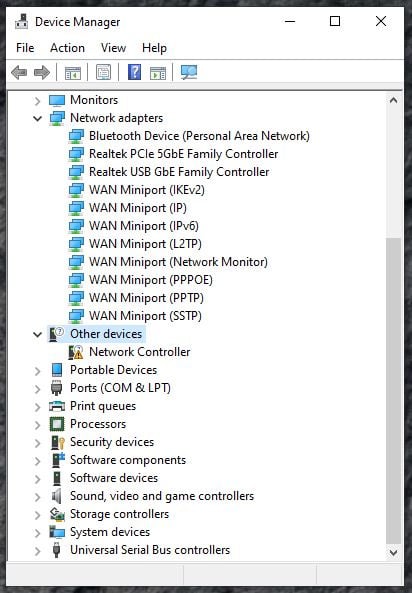
When you get to the point you've updated all the motherboard drivers and still cannot find the Device drivers needed, where do you look next, especially when the Device driver is categorized as "Other Devices" ?
Right-click on the Device, go to the "[ Event ]" tab for each device driver that shows a yellow exclamation, and copy the following information, highlighted in dark blue, into Notepad (in this case I believe, the Device driver for wifi7):
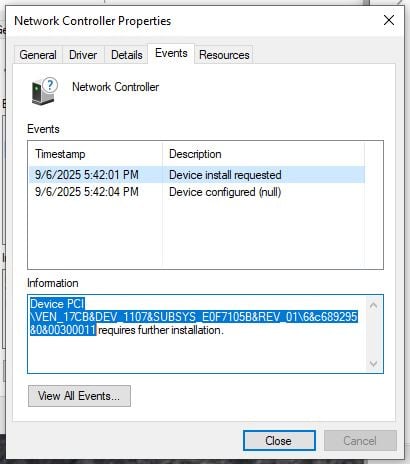
You use to be able to go to Microsnot, enter the vendor (VEN) and Device (DEV) information, and receive data from the Windows Hardware Compatibility List telling you who the vendor and device was. Well, that was before Microsnot started their "kill Windows 10 so we can spy on and data-mine your personal information" campaign… otherwise known as Windows 11.
Gotta love the greed… 🤑
-
Go back to Notepad, where you copied the Events log information for each of the Devices with driver issues. Here's what that information tells us, that can be used to help find each missing driver. Each Device entry breaks down as follows:
Device PCI\VEN_17CB&DEV_1107&SUBSYS_E0F7105B&REV_01\6&c689295&0&00300011
Device PCI: tells you the device is connected to or part of the PCI bus (e.g. part of the chipset)
VEN_17CB: tells you the vendor that "wrote" the driver for this device (in this case it is Qualcomm)
DEV_1107: provides information identifying the device (model number, chipset ID, etc.)
SUBSYS_E0F7105B: subsystem information that identifies the component (Micro Star International, 7E07 - an MSI Z790 motherboard)
REV_01: identifies the revision number of the system device (in this case MSI motherboard revision 1)
So the first question I had (and is still unresolved), is why is what should be a Qualcomm WiFi driver, being identified as a for an Intel 790-based MSI motherboard ?
The first program I used is called DriverIdentifier. It is outstanding, in that it scans all your device drivers, then produces a listing of all known uses of the driver, with links to each potential driver update solution. Here are two short videos showing how to use DriverIdentifer, and to install updates:
-
After trying multiple drivers listed in DriverIdentifier, all proved to be based upon Intel motherboards, including the one MSI driver listed, so I will continue reviewing their daily "Latest scans" updates, looking through each listing for MSI:
(https://www.driveridentifier.com/latest_scan.php)
Back to Microsnot
.
So I went dumpster diving on Micronot's "Identifiers for PCI Devices - Windows drivers" page, going to the link. Here I simply search through each level until there were no more links to check. Here's what I found:
https://pci-ids.ucw.cz/ (under Browse, click the link "PCI Devices")
https://admin.pci-ids.ucw.cz/read/PC (takes you to the Vendor list; click the "1" link, since the four-digit ID begins with "1")
https://admin.pci-ids.ucw.cz/read/PC?restrict=1 (vendor list for all vender IDs beginning with "1"; paging down to "17CB" shows - (Name: Qualcomm Technologies, Inc / Notes: Airgo Networks, Inc)
https://admin.pci-ids.ucw.cz/read/PC/17cb (ID 1107 = Name: WCN785x Wi-Fi 7(802.11be) 320MHz 2x2 [FastConnect 7800])
https://admin.pci-ids.ucw.cz/read/PC/17cb/1107 (Name: WCN785x Wi-Fi 7(802.11be) 320MHz 2x2 [FastConnect 7800])
https://admin.pci-ids.ucw.cz/read/PC/17cb/1107/105be0f7 (Name: High Band Simultaneous Wireless Network Adapter)
This is the end of the road, so to speak - the lowest level to which the Device information from the Events log can be traced. So what has this yielded ?
One, that this Device driver is indeed for Qualcomm. Second and more importantly, that it is the Device driver for Qualcomm's WCN785x High Band Simultaneous Wireless Network Adapter card.
Next I searched "WCN785x High Band Simultaneous Wireless Network Adapter", which opened up a new field of rabbit holes…
-
to be updated…
Leave a Comment
Categories
- All Categories
- 1 The Blog
- 1 What's Trending
- 8K The Community
- 3.2K General Discussion
- 146 New Members
- 873 Consumer Tech
- 234 Prebuilt PCs and Laptops
- 168 Software
- 33 Audio/Visual
- 54 Networking & Security
- 4 Home Automation
- 5 Digital Photography
- 14 Content Creators
- 30 Hobby Boards & Projects
- 84 3D Printing
- 83 Retro Arcade/Gaming
- 62 All Other Tech
- 455 PowerSpec
- 2.6K Store Information and Policy
- 152 Off Topic
- 63 Community Ideas & Feedback
- 619 Your Completed Builds
- 4K Build-Your-Own PC
- 2.9K Help Choosing Parts
- 328 Graphics Cards
- 335 CPUs, Memory, and Motherboards
- 145 Cases and Power Supplies
- 54 Air and Liquid Cooling
- 51 Monitors and Displays
- 93 Peripherals
- 70 All Other Parts
- 65 Featured Categories
We love seeing what our customers build
Submit photos and a description of your PC to our build showcase
Submit NowLooking for a little inspiration?
See other custom PC builds and get some ideas for what can be done
View Build ShowcaseSAME DAY CUSTOM BUILD SERVICE
If You Can Dream it, We Can Build it.

Services starting at $149.99