
PowerSpec G536 Gaming PC randomly restarting while gaming


Hello ive had my powerspec for 1 day and it has already restarted several times out of no where while gaming. It simply freezes and restarts out of no where. Is there anything to resolve this or do i need to return this product?
Answers
-
I've literally had it for 1 day as well and I'm dealing with the same issue. 11 times already. I'm on the verge of returning this piece of trash
-
I changed my GPU's PCIe from Gen 5 to Gen 4 and that seemed to help. No restarts since.
-
Its making me pretty nervous since i am not running any crazy game at max settings just very casual gaming and it will randomly lock up and just restart with no error code or different screen.
-
When it locks up, how long does it take to restart?
-
It freezes for 3-5 seconds then turns off and restarts as normal which is pretty quick
-
We can replace the system of course, which may be the easiest solution here. If you want to troubleshoot it, I'd ask you to run Memtestx86 and see if it also freeze and reboots or if we see any errors.
-
how do i go about running the memtestx86 ?
-
You use their tool to create a bootable flash drive then boot to it. Just let it go and it'll run 4 passes. Boot menu key on your board is F12 on startup.
-
Hi everyone, I’m having what seems to be the same issue with my PowerSpec G536, and unfortunately this has now happened with two different G536 units.
I originally purchased a G536 with the Ryzen 5 7500X3D, RTX 5070 12GB, 32GB DDR5-6000, Gigabyte B850 Gaming WIFI6 motherboard, and 850W PSU.First G536:
I had two sudden freezes/restarts while gaming, including while playing ARC Raiders. There was no BSOD and no error message. The PC would simply freeze and restart.In Event Viewer, both crashes showed:
- Kernel-Power Event ID 41
- BugcheckCode: 0
- No BugCheck event
- No WHEA hardware error
- No normal Windows shutdown|
Temperatures looked completely normal. CPU temperatures were around the low/mid 70s °C and GPU temperatures were around the 60s °C, with no thermal throttling.
After the second crash, I returned that PC to Micro Center and exchanged it for another G536 on September 5, 2026.
Second G536:
The replacement initially worked very well. I was able to play for long periods without any crashes.I monitored it with HWiNFO and the system looked healthy:
- CPU max: about 74.9°C
- GPU max: about 66.1°C
- GPU hotspot max: about 77.2°C
- GPU power max: about 209W
- No thermal throttling
- RAM usage was normal
- PCIe lane errors were 0 in the monitoring log
The RAM is running at approximately 6000 MT/s as configured.
However, after around 12 days, the replacement PC started doing the same thing.
I had another sudden freeze/restart on September 17, and then another one on September 18 around 10:23 PM.
The September 18 crash was especially interesting because about two minutes before the PC restarted, my monitor suddenly went completely black while I was gaming.
I turned the monitor off and back on, and the picture returned. About two minutes later, the PC froze again, lost video, and restarted.
I exported a large section of the Windows System log after that crash. The result was again:
- Kernel-Power Event ID 41
- BugcheckCode: 0
- All BugcheckParameters: 0
- PowerButtonTimestamp: 0
- LongPowerButtonPressDetected: false
- WHEABootErrorCount: 0
I also searched the log for:
- nvlddmkm
- WHEA-Logger
- BugCheck
- volmgr
There were no events from those sources immediately before the crash. It basically looks like the system suddenly stops logging and then starts a new boot.
I have also had a separate display issue where my monitor can flicker badly at higher refresh rates. At 165 Hz the flickering can be severe, while at 60 Hz it is usually stable. Power-cycling the monitor has also temporarily fixed the flickering. Because of that, I’m not sure whether the display issue is related to the PC restarts or is a separate monitor/DisplayPort issue.
My replacement system is currently using:
- PowerSpec G536
- Ryzen 5 7500X3D
- ASUS Dual RTX 5070 Gaming OC 12GB
- Gigabyte B850 Gaming WIFI6
- 32GB DDR5-6000
- Kingston NV3 1TB NVMe
- 850W PSU
- BIOS: F11b GA2
What concerns me most is that I have now experienced essentially the same hard freeze/restart behavior on two separate G536 systems.
Thanks.tion.
-
Having the same issue, just purchased mine today. Freezes and restarts randomly, even when not playing games. Even froze and restart on initial boot.
Memory Diagnostics came back negative, only other issue i’m having is Windows 11, Version 25h2 - even when downloaded manually.
-
I just return mine, i got same problem in 2 deferments machines same build, today i got a G534 and so far so good no problems
i strong recommend u to return -
Glad this machine is running correctly.
@CMarshall I'll upload a BIOS update here I'd like you to try.
-
@PowerSpec_MikeW I ended up downloading the Gigabyte Control Center from their website.
There were quite a few driver updates/security updates i was able to obtain from that App that have seemed to fix it today.
If i have any other freezing issues i will most certainly return, but so far today no issues after those updates I located in Gigabyte control center
-
Bought one Friday had to switch it out today for the same issues (sunday) gamed for a few hrs after getting it home (I live an hr and a half away) and it crashes again same exact thing you have going on kernel 41 no bugs on two separate units . super lame and frustrating guess imma go get a refund this friday after work bc i dont have time to do it all week :(
-
We apologize for the trouble with the new system and will certainly exchange it. For this platform I'm working on an updated BIOS that may address these issues depending on the root cause. Waiting on Gigabyte now, I'm hopeful they'll get it back to me today.
-
@PowerSpec_MikeW please notify me when you obtain, no issues still after utilizing gigabyte control center application and updating drivers/security there. But just in case it persists.
Still have 13 days to refund. -
Ran into some issues, should have it fixed tomorrow, then another day to test.
-
Got home yesterday, turned on my pc and it crashed almost immediately after I opened Steam. After restarting I tried what JarlsCunior suggested and changed my GPUs PCIe link speed from Auto to Gen 4. So far so good. I gamed for several hours after making that change and had zero crashes. If this ends up fixing the issue I’m definitely going to keep the PC. It’s a great deal and I’d really like to keep it. I have no problem leaving it on Gen 4 for the time being, and hopefully the upcoming BIOS update can address whatever is causing the instability when running Gen 5/Auto. Thank you Mike for working on this, and thank you JarlsCunior for suggesting the Gen 4 workaround!
-
now having this same exact problem after downloading all the gigabyte control center updates and changing gpus pcie link speed to gen 4, what is wrong with this line of computers, does anyone know a fix? i dont feel like going returning unless i have to
-
-
@PowerSpec_MikeW I have just flashed the BIOS update - I let you guys know how it runs today and tomorrow.
Still ran into freezes after control center updates, but much less frequently - the first day it didn’t crash at all. -
Let me know, I'm testing the BIOS now on a system. I'll be running memtestx86 on it for 5 days.
-
@PowerSpec_MikeW I don't have a flash drive right now so ill let you know if this works for me some time this week
-
@PowerSpec_MikeW flashed it today ill let you know how it goes
-
Keep us updated. My test unit is two days into memtestx86.
-
had a freeze similar to when it crashed previously but it recovered flawlessly, ill keep you updated it seems to only happen when a game crashes now but my windows doesn't completely shut down
-
@PowerSpec_MikeW I'm having the same issue, the PC has been restarting itself multiple times since I first started using it this morning. I don't have a flash drive, is there any other way I can update it?
-
@PowerSpec_MikeW and the rest of us troubleshooting this.
Flashing the F12c BIOS has fixed any freezing/black screen/restart so far. About 12-15 Hours of gameplay, Max Settings, no issues.
I am still on PCI Link speed 4, don’t really care for the extra 5ish frames on Gen 5 but if anyone is running F12c of Gen 5 please let us know how it’s running -
Unfortunately flash drive is on the only way right now. We can flash it at service for you of course.
-
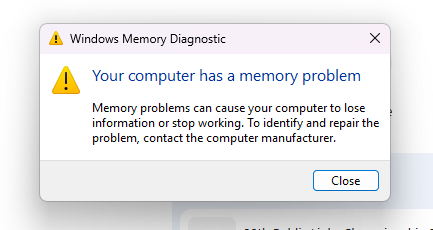
I ran diagnostic and this came back.. Guess I need to reach out to support? Bought the computer 6 days ago.


Leave a Comment
Categories
- All Categories
- 1 The Blog
- 1 What's Trending
- 8.2K The Community
- 3.3K General Discussion
- 153 New Members
- 896 Consumer Tech
- 248 Prebuilt PCs and Laptops
- 171 Software
- 33 Audio/Visual
- 54 Networking & Security
- 4 Home Automation
- 5 Digital Photography
- 14 Content Creators
- 30 Hobby Boards & Projects
- 85 3D Printing
- 84 Retro Arcade/Gaming
- 64 All Other Tech
- 521 PowerSpec
- 2.7K Store Information and Policy
- 156 Off Topic
- 70 Community Ideas & Feedback
- 620 Your Completed Builds
- 4.1K Build-Your-Own PC
- 3K Help Choosing Parts
- 329 Graphics Cards
- 339 CPUs, Memory, and Motherboards
- 146 Cases and Power Supplies
- 54 Air and Liquid Cooling
- 51 Monitors and Displays
- 94 Peripherals
- 71 All Other Parts
- 65 Featured Categories
We love seeing what our customers build
Submit photos and a description of your PC to our build showcase
Submit NowLooking for a little inspiration?
See other custom PC builds and get some ideas for what can be done
View Build ShowcaseSAME DAY CUSTOM BUILD SERVICE
If You Can Dream it, We Can Build it.
Services starting at $149.99