
Issue with Rtx 3080


Greetings, I recently got my Rtx 3080 Msi Gaming Trio X and after two days my monitor started to lost signal and the sound output source randomly while watching YouTube or just browsing the web I use Mozilla Firefox or it happens when is just idle, while playing it works fine; I use two monitors and I since this started to happen I tried just using one and it keeps happening; I did uninstall and install the drivers for the card, tried using Msi Afterburn to check if getting the card warm at high loads would emulate the issue but nothing happened the temperature didn't go over 71 degrees; I updated my motherboard too and I have a 850W Psu, the only thing that I notice was that every time this happens the clock speed have very high spikes and the load goes for 184%, I even format my Pc without result.
Here are my computer specs:
Case: Nzxt H700
CPU cooling: Nzxt kraken X72
Motherboard: Msi MEG Z390 ACE Wifi
CPU: Intel Core i7 9700K
Power Supply: Seasonic Focus Plus 850W Gold
Ram: G.Skill TridentZ RGB 64GB(2x 32gb) 3600 MHz
SSD Samsung 970 Evo 500GB
SSD WD SN750 1TB
HDD: Seagate Barracuda 2TB
PD. I only activate XMP for the RAM but I don't overclock my Gpu or Cpu.
Comments
-
I forgot to mention the card has 3 (6+2) cables going directly to the power
-
Hello, @Lui21 are you noticing that this occurs after a set amount of time?
It sounds like it might be going into a sleep state. I'd recommend changing your power settings.
Type "Power & Sleep Settings" in the start menu, then select "Additional power settings", next, On the left, select "Choose when to turn off the display" and then change the time to a longer amount of time.
Let us know if this solves this for you.
-
Alright it was in Power Saver mode so I changed to Balanced, also I changed the Turn Off Display and Put the computer to sleep option to Never. (It was at 45 minutes)
-
Good choice.
Hopefully, that solves this issue for you, but do let us know if it continues. We're happy to help further.
-
After testing these last days I keep getting the same problem Gpu load goes over 200% for like one second and screen lost signal and come back after a few moments and it wasn't after a specific amount of time on, I could be a whole day without any issues and another day it happens after a couple minutes on.
-
@Lui21 just chiming in. I saw you mentioned you updated your motherboard. What drivers did you update on your motherboard? Also let us know what bios version you are on. Press the Microsoft Key (keyboard) + R to open the Run box. Type msinfor32 and hit enter. Reply back with the whole row under "Bios Version/Date" to us, right under System Summary (this header is on the top left). That way we can see what version and date you are are on.
Also for both monitors are you using Displayport (dp) cable on each monitor or are you doing HDMI for one and dp for the other?
-
I typed msinfor32 in the Run window and it gave me error, I just got the update version from the Dragon center app;
Bios Version: 1.A0
Bios Release: 10/13/2020
I'm using one monitor with a display port and for the other and adapter Vga to Dp.
-
Have you tried running without the Dragon Center app installed?
I believe that there has been a new driver release since the last time we spoke. Could you attempt a clean install of the latest drivers?
Which display is dropping out when the issue occurs? Is it the DP or the VGA to DP?
-
This problem happens with both screens and I tried using just one at the time, getting with same results.
I just did a clean install for the gpu drivers and uninstall dragon center, now I'll just wait and see what happens.
-
@Lui21 Keep us updated!
-
"msinfor32" is not the right command. Lose the "r": msinfo32
-
@Lui21 Sorry, yes the command is 'msinfo32'. The 'r' was a typo on my end. But we need to see what bios version you are on. Also have you updated your meg z390 ace chipset drivers?
https://www.msi.com/Motherboard/support/MEG-Z390-ACE#down-driver&Win10%2064
-

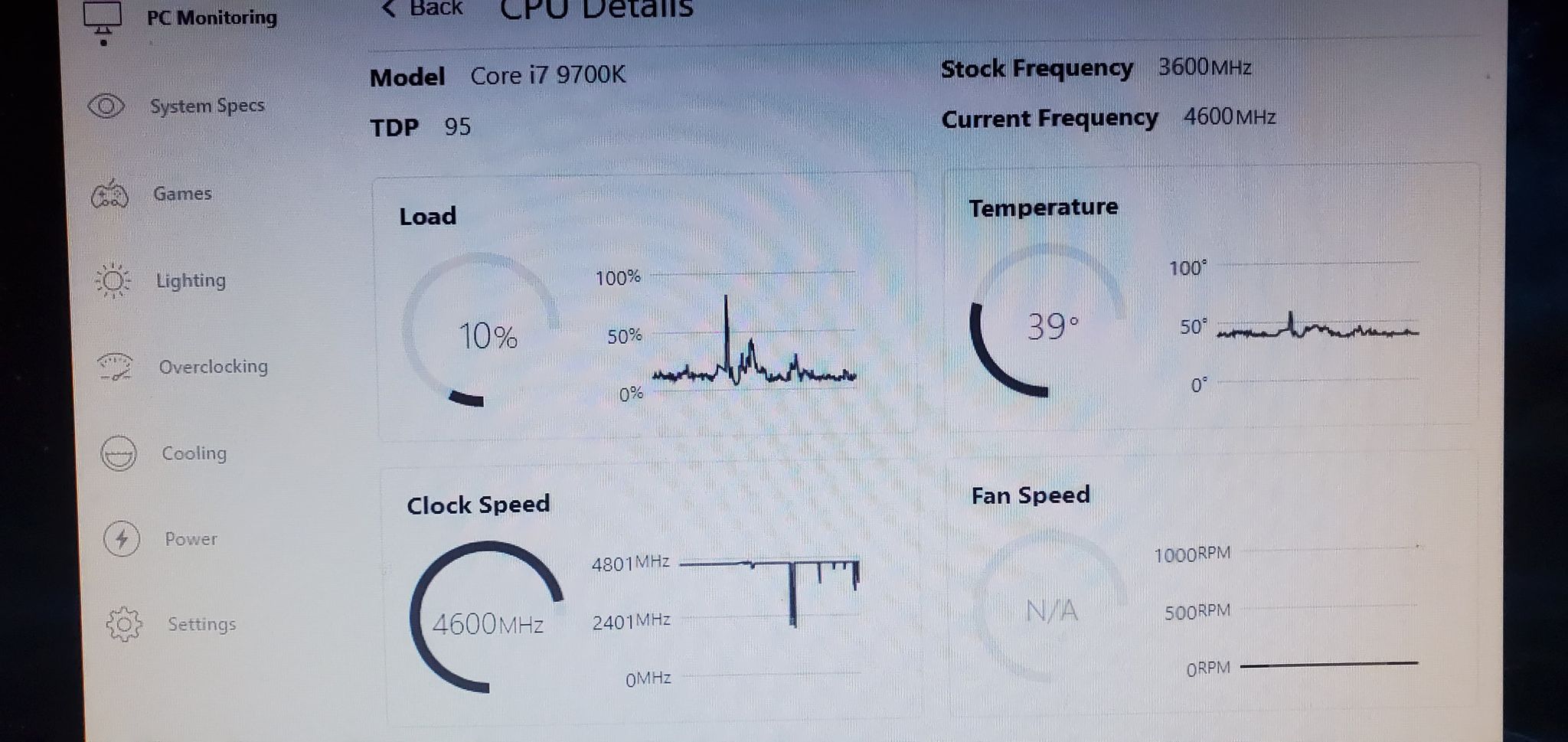

That's the behavior of the gpu and cpu when the signal get lost and the screens go black for like 4 seconds, that happened today.
About the Bios update do I need to install each one individually or just the last one? I just installed the last one.
-
@Lui21 is your monitors still losing signal or audio when using the computer?
If so, try these steps.
Use the link below, download and install your chipset drivers ("intel Chipset Drivers). Just click on the down arrow and execute the installation file, follow the installation wizard instructions.
Once its installed, then test your system, watch YouTube or try to get the monitors to give you no signal. Basically try to replicate your issue after the chipset driver. Don't worry about how the graphic card is performing, you are just testing how your system is functioning after the chipset driver update. Launch a game as well.
:Click on System & Chipset Drivers
https://www.msi.com/Motherboard/support/MEG-Z390-ACE#down-driver&Win10%2064
If you are able to replicate the issue, then try updating the bios.
Read these instructions first on how to update your bios. You'll need a usb thumb drive as well.
https://us.msi.com/support/technical_details/MB_BIOS_Update
Once you are done reading the instructions and understand how to update your bios. then click on the down arrow for version 7B12v1A and save it to USB. Finish out the BIOS update steps from the link.
After this update, test your system again. Watch Youtube, launch a game, etc., to see if these updates have fixed anything.
If not comfortable with following these steps or they do not work, bring your system to the store for our techs in the store to run a diagnostic on it.


Categories
- All Categories
- 1 The Blog
- 1 What's Trending
- 8.2K The Community
- 3.3K General Discussion
- 152 New Members
- 893 Consumer Tech
- 245 Prebuilt PCs and Laptops
- 171 Software
- 33 Audio/Visual
- 54 Networking & Security
- 4 Home Automation
- 5 Digital Photography
- 14 Content Creators
- 30 Hobby Boards & Projects
- 85 3D Printing
- 84 Retro Arcade/Gaming
- 64 All Other Tech
- 511 PowerSpec
- 2.7K Store Information and Policy
- 156 Off Topic
- 69 Community Ideas & Feedback
- 620 Your Completed Builds
- 4.1K Build-Your-Own PC
- 3K Help Choosing Parts
- 329 Graphics Cards
- 339 CPUs, Memory, and Motherboards
- 146 Cases and Power Supplies
- 54 Air and Liquid Cooling
- 51 Monitors and Displays
- 94 Peripherals
- 71 All Other Parts
- 65 Featured Categories
We love seeing what our customers build
Submit photos and a description of your PC to our build showcase
Submit NowLooking for a little inspiration?
See other custom PC builds and get some ideas for what can be done
View Build ShowcaseSAME DAY CUSTOM BUILD SERVICE
If You Can Dream it, We Can Build it.

Services starting at $149.99