
Powerspec G527 frequent Hard crash / reboots


Hi all,
recently picked up a G527 (Ryzen 7500x3d, MSI B850, powercolor 9060XT) to replace my nearly 10 years old intel build. I was excited to get back into some games but I've run into increasingly frequent crashes black screen/blue screen/reboot into windows (which show as event ID 41 in W11 Event Viewer). This primarily occurs under load (Cyberpunk/Helldivers/Heaven). I do see an occasional crash during low utilization just browsing the web and listening to music, however.
One thing that stands out is that I am seeing pretty high GPU temps (85c core / 110c+ hotspot) under load with the default fan settings:
if I force the fan to 100pct in afterburner (also increased the case fan ramp up rate in bios for additional support), the temps don't look as awful, but I still face crashes at random.
Chipset drivers, graphics drivers, and windows are all up to date.
Any other things to check before trying to warranty? Closest store is over an hour drive so I want to make sure I've done everything before I hit the road :)
Comments
-
well, this is an odd one. Never found anything useful in Windows event viewer that would have led me to this but with the GPU temps in check and continued crashing, I was poking around with more testing.
I was running OCCT and realized that after 2 hours the system hadn't crashed. it was only things with audio, like the games / heaven benchmark. Reset audio drivers and it ran heaven bench for 2 hours and cyberpunk for an hour without crashing. Fingers crossed that it's nothing more -
Strange, unless it pulled down a driver update, but that should of happened on the first day. Let me know what you see going forward.
-
Got my son his first gaming PC for Christmas, g527. He's also had some freezing and reboots while gaming. Event ID 41 as well. He has played fortnite and Forza Horizon 4. I updated windows and AMD driver. Since update he also gets an unsupported graphics card message when opening Forza, error FH204. Clicked Option to ignore and continue and game worked. It's been a bit frustrating that a brand new PC isn't running smoother. Any suggestions?
-
Run this tool and see if it's logging any crashes:
For the driver, do a clean install:
Run that tool, then reinstall the latest driver.
-
Was running fine for two days but then random reboots while my son was playing fortnite. No blue screen crashed detected. Ran the AMD Cleanup Utility and installed Adrenalin again so we'll see.
-
I’m buying the PC so hopefully things are smooth
-
I disabled EXPO in the BIOS and since then we haven't had any issues. Possible fix?
-
Enable EXPO again but before going saving, go into the overclocking settings. Find VDDP. The default voltage is 1.15V, lower it to 0.95V. Then save and exit.
-
This correct?
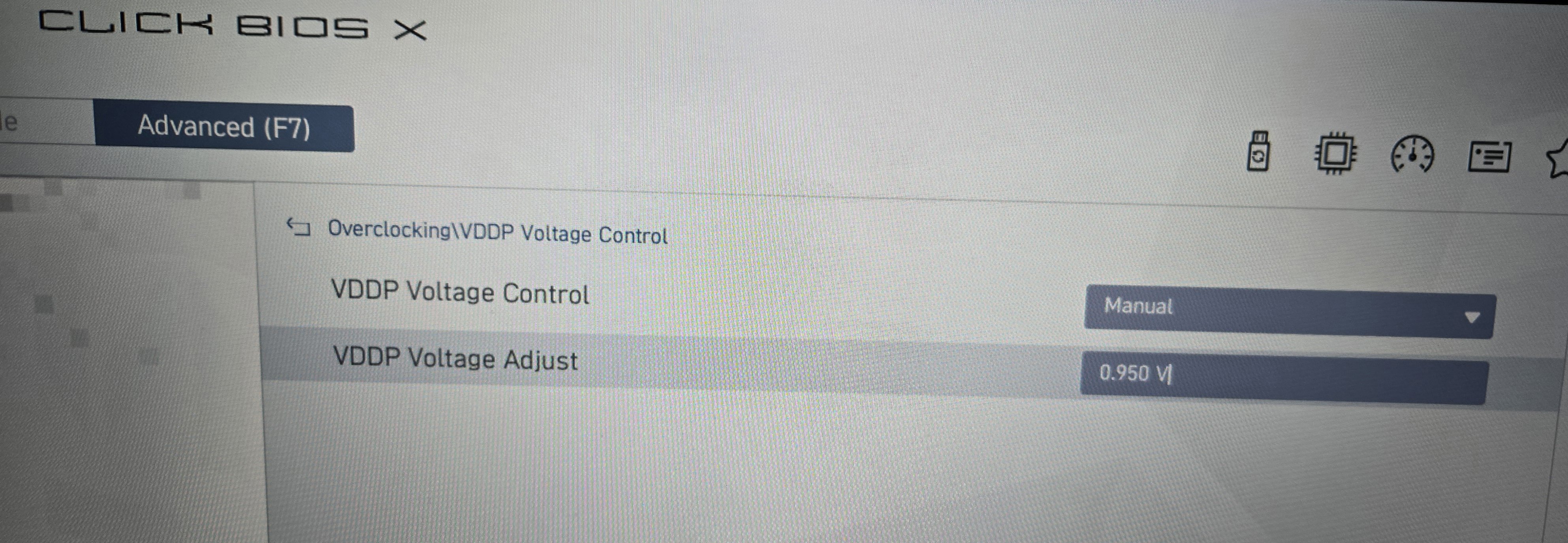
-
Yes.
-
I am having a similar issue with my g527 that I purchased on Black Friday. Random freezing or crashing during games, mostly just going back to the desktop but lately the computer will reboot. It has happened with Battlefield 6, The First Descendant, F1 25 and Fallout 25. I followed the same steps suggested to @ColFurbin but I'm still getting game/system crashes. Its a bit frustrating especially since I don't experience near the number of crashes on my 2023 Asus A16 laptop. Any further suggestions would be greatly appreciated.
-
Sounds like worsening instability. I'd check the RAM with Memtestx86 if possible. See if you can pass overnight.
-
Copy. i will try that tonight.
-
Keep us updated because I'm dealing with same exact issue now, I bought an open box one but it's giving me a real damn headache..
-
@J0kaWi1d86
I also Uninstalled adrenalin, then ran the amd cleanup utility, and then reinstalled adrenalin. I read somewhere about some issues with the Realtek Gaming 2.5Gbe Family Controller so I disabled it since I use wifi and not a wired ethernet connection. These changes, combined with disabling EXPO, have resulted in a stable PC. My son has mostly played Forza Horizon and Fortnite running 1440p at 240 fps without any freezes or reboots. Hope this helps. -
Thanks for the suggestion. I will try that next. i ran the Memtestx86 and it passed but I'm still having crashes, though not as frequently.
-
Checkin in — While chasing stability I ended up making a few more tweaks. System uptime is now a week plus with several hour long gaming sessions every day.
For crashing during high graphical intensity in games (large number of rendered particles/enemies in Helldivers2, cyberpunk downtown areas)
GPU - the powercolor clock limit was something absurd like 3750mhz. I capped it to 3300 with Afterburner
Random crash, even at idle:
CPU - BIOS changes:
- disabled ERP
- disabled global C-States
- PBO > Advanced > curve optimizer: Sign positive, offset/magnitude 20 «««««««««««««««««««««« doing everything else made a large difference in stability but I was still crashing at idle, this was the final piece of the puzzle. -
You're +20 all core? What are your temps?
-
seeing 75C after an hour sitting at 100pct utilization with OCCT. Admittedly I aught to be able to dial it back some but I've been lazy 😅
but yeah, adding vcore stopped the last of the crashes that I was seeing after everything else mentioned in this thread.
edit: dropped to +10 all cores, seems to remain stable -
Heelo, I have this same PC and was having the same random crashes. Tried everything I could think of under the sun but nothing seemed to fix it. There were random issues in event viewer but nothing specific that seemed like it could be causing the freezes. Temps and everything else was fine.
Got so frustrated, I wound up doing a fresh install of windows (forgetting to back up all my old files 😢) and that didn't even help.
FINALLY updated my bios to the latest version, and Violá! No crashes since then. World of Warships constantly caused the freezing as did Helldivers 2, but they've been stable since the bios update. I recommend you all try this. -
We're finishing up a BIOS based on 1A52.





Leave a Comment
Categories
- All Categories
- 1 The Blog
- 1 What's Trending
- 8.1K The Community
- 3.2K General Discussion
- 149 New Members
- 885 Consumer Tech
- 240 Prebuilt PCs and Laptops
- 171 Software
- 33 Audio/Visual
- 54 Networking & Security
- 4 Home Automation
- 5 Digital Photography
- 14 Content Creators
- 30 Hobby Boards & Projects
- 84 3D Printing
- 84 Retro Arcade/Gaming
- 63 All Other Tech
- 477 PowerSpec
- 2.7K Store Information and Policy
- 153 Off Topic
- 66 Community Ideas & Feedback
- 620 Your Completed Builds
- 4.1K Build-Your-Own PC
- 3K Help Choosing Parts
- 329 Graphics Cards
- 338 CPUs, Memory, and Motherboards
- 146 Cases and Power Supplies
- 54 Air and Liquid Cooling
- 51 Monitors and Displays
- 94 Peripherals
- 71 All Other Parts
- 65 Featured Categories
We love seeing what our customers build
Submit photos and a description of your PC to our build showcase
Submit NowLooking for a little inspiration?
See other custom PC builds and get some ideas for what can be done
View Build ShowcaseSAME DAY CUSTOM BUILD SERVICE
If You Can Dream it, We Can Build it.

Services starting at $149.99