
PowerSpec G914 Software Issue


Hey, I think I posted this in the wrong section yesterday, sorry about that! I recently purchased a PowerSpec G914 and it came with a standalone / OEM version of the Mystic Light Lite app which was very efficient and worked perfectly! After doing a fresh install of windows, I realized I couldn’t find a link to the standalone version of Mystic Light Lite that shipped with the PC anywhere (the G914 downloads page only has bios updates, and I did not see it in the PowerSpec dashboard).
Unfortunately, the MSI Center version of Mystic Light consumes way more resources and causes theme desync issues that did not occur with the standalone. Was hoping someone here might be able to provide a download link for the Mystic Light Lite that shipped with the computer (I believe version was 3.0.0.7).
Answers
-
Let me see what I can do. Ours is a special SI version with an installer script. I'll talk to MSI.
-
@PowerSpec_MikeW Thank you so much! Your version of the software was significantly more performant than anything else I have tried.
-
Hi, a quick google search landed me here with the exact same dilemma. I'd love to get Mystic Lite back if at all possible!
-
I uploaded it on the G914 page:
-
Thanks, I really appreciate you helping out with this! Unfortunately though, there was an issue. The app installs with no problem, but when I tried to run it, I got the following error:
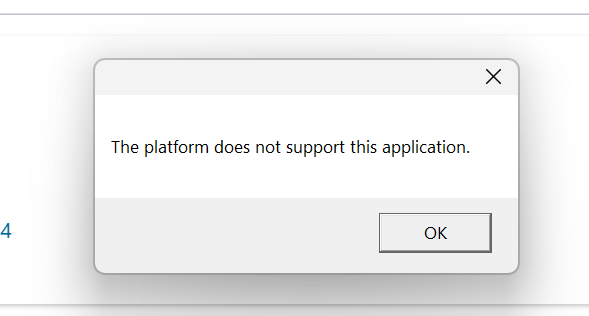
No hardware in the system has changed, and the only difference from when I brought the system home is a reinstallation of Windows. I installed both the plain .exe version, as well as the .zip file version, and also tried running as administrator once installed, but I still get that message. Any ideas?
-
What BIOS version are you on?
-
I'm on version 7E59v2A95, with a release date 1/22/26. I don't remember the specific version, but the system came with a BIOS dated in July.
-
I'll set one up and our version of 2A95 and check it Monday. With Mystic Lite, if you break their framework stack it can be difficult to repair. I've written some scripts in the past to fix it.
-
No issue on the latest BIOS on my end. I'll do a clean install tomorrow and see what happens.
-
Clean 25H2 install and installed the software. It works fine.
-
A clean install worked for me too. Even though I uninstalled Signal RGB and the full version of Mystic Light, maybe some left over files were causing an issue. Thanks Mike, I really appreciate your help!
-
I'm trying to update the BIOS for the g914, haven't done it before and need help with the steps. From what I understood is, I need to download the zip file from the micro center website on a USB drive, then start bios and then clicking control+alt+t to install? Also are there any bios settings I need to turn on after finishing the update or leave everything on default ? Thank you
-
Extract the BIOS from the zip file onto the flash drive. Otherwise, you've got it. Just enable XMP/EXPO after the flash.


Leave a Comment
Categories
- All Categories
- 1 The Blog
- 1 What's Trending
- 8.1K The Community
- 3.2K General Discussion
- 152 New Members
- 891 Consumer Tech
- 244 Prebuilt PCs and Laptops
- 171 Software
- 33 Audio/Visual
- 54 Networking & Security
- 4 Home Automation
- 5 Digital Photography
- 14 Content Creators
- 30 Hobby Boards & Projects
- 84 3D Printing
- 84 Retro Arcade/Gaming
- 64 All Other Tech
- 499 PowerSpec
- 2.7K Store Information and Policy
- 155 Off Topic
- 68 Community Ideas & Feedback
- 620 Your Completed Builds
- 4.1K Build-Your-Own PC
- 3K Help Choosing Parts
- 329 Graphics Cards
- 339 CPUs, Memory, and Motherboards
- 146 Cases and Power Supplies
- 54 Air and Liquid Cooling
- 51 Monitors and Displays
- 94 Peripherals
- 71 All Other Parts
- 65 Featured Categories
We love seeing what our customers build
Submit photos and a description of your PC to our build showcase
Submit NowLooking for a little inspiration?
See other custom PC builds and get some ideas for what can be done
View Build ShowcaseSAME DAY CUSTOM BUILD SERVICE
If You Can Dream it, We Can Build it.

Services starting at $149.99