
PowerSpec BIOS Requests and Questions - AMD
Comments
-
And your project mode is set to extended or duplicate screens? Does it detect it in Display Settings?
-
Hey hey, need a new firmware for my hanging machine: Powerspec AI90, Bios 9003, cold-boot hangs on the first power-on, works on second. I've done a fast startup fix and turned off sleep, but I know this ProArt motherboard is constantly getting bios updates because of its quirks.
And is there a way to get it back to ASUS bios control? I know why you guys Powerspec bios things but in this particular case with such a complex build its removed a lot of easy fixing/tweak capabilities in an already funky mb with a diva GPU
tyty! -
Most of the time we're not changing much. Mainly making sure security features like secure boot and firmware TPM are enabled. We'll enable PXE for network deployment, but that won't affect performance. We don't hide any settings or anything of that nature. Sometimes we tweak voltage or the training algorithms for certain memory kits. You can flash an ASUS BIOS without issue. We can work on a new one, but I'd like to check what it trained or retrained to and maybe it's just a simple tweak. Could you screenshot Zentimings?
-
Hi Mike - cool, makes sense! I'll use yours first then; I turned off sleep and forced it to retrain memory every reboot, and disabled PowerDown, so it takes a while but no longer hanging, so hopefully it is just a bios issue.
Please see attached for that screenshot!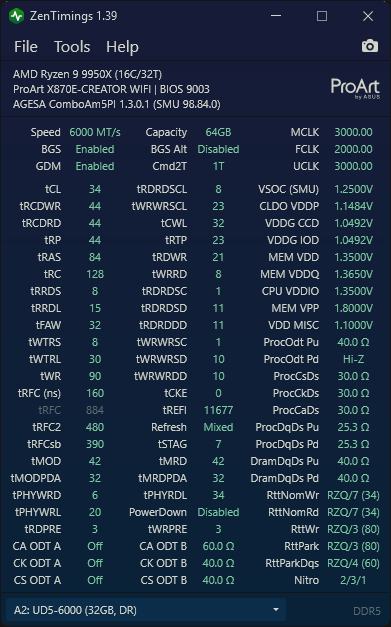
-
In the BIOS, set your VDDP voltage to manual and 0.90V. See if that resolves the cold boot issue.
-
Thank you! My cold boot is solid right now (5 clean ones) after disabling MCR; do you still recommend that tweak? And may I do it after flashing the bios based on 1.3.0.1b? Want to try that first, even tho' looks like a small revision, I know memory is one of the aspects of these AGESA-coded mbs they're often updating.
-
Your call, disabling MCR will fix the problem, but it's a slower boot. If that's not an issue you can stick with that. But I think you can probably turn it back on and solve your issue with the VDDP adjustment. VDDP is IMC voltage to the CPU and you'd be lowering it by 250mV.
I haven't seen any changes on the new AGESA firmware with this platform.
-
Cool ty! Then I'll try that and let you know if there are any other issues. Oh I used afterburner to undervolt a bit since I'm using the comp purely for creative/3d/AI purposes - any issues with that setting along with the VDDP adjustment?
-
Shouldn't effect it. It's IMC exclusively.
-
When do you think 4.43 will be available?
-
-
-
@PowerSpec_MikeW Thank you so much, gave it a couple of days of cold boots, updated the drivers via ddu so it was clean, and it's turning on smoothly now.
Appreciate your help! -
I own a PowerSpec G531prebuilt with a Gigabyte B850 Gaming WIFI6 motherboard. It is currently locked on factory BIOS F10 GA2, i keep getting the PNP_DETECTED_FATAL_ERROR while gaming at 240Hz, idk if it was the higher hz, or higher polling keyboard but it crashes mid game on apex legends and fortnite so far, i dont think anything else, Can you provide the download link for the latest official PowerSpec-approved BIOS update?
-
Hi Mike,
I have an AI90 system and came looking for information about the BIOS — saw the post you had with Emily on it. Wanted to check a few things.
Issue: The system ran fine for about a month with no BIOS changes on my end — I never had a reason to go into BIOS, so I can't say for certain which EXPO profile was active at the time. Then one day it failed to POST, first bouncing into ASUS's BIOS safe-mode recovery, then getting worse and losing video output entirely. I had to clear CMOS with the jumper/button to get it booting again.
After the CMOS clear, I went into BIOS to make sure EXPO was actually set and I wasn't just running at the default 4800 speed. That's when I found that I couldn't boot on EXPO Profile 1 — every time I set it to Profile 1, the system would boot into ASUS's safe-mode BIOS. EXPO Profile 2 boots and is stable, and I've been running that since.
ZenTimings screenshot attached, captured while running on EXPO 2 so you can see what it's actually trained to.
One more thing: I checked the ASUS support page for this board, and the latest BIOS (2402) changelog specifically lists "enhanced memory performance, system stability, and compatibility with CXMT memory chips." That sounds like it could be directly related to what I'm seeing. You'd mentioned flashing the stock ASUS BIOS is fine — if I go that route myself, what downsides should I expect versus staying on 9003, and would that impact warranty or support?
-
Flashing an ASUS BIOS won't void your warranty. I would try the same thing as I recommended to her. It's normal for EXPO to be off after clearing CMOS. Enable EXPO, then go and change the VDDP to 0.90 before you save and exit. See if it'll train then.
We're not using CXMT chips on those modules, it shouldn't matter.
-
Attached 9004. I changed the XMP/EXPO VDDP voltage setting. Might be an easier option.
-
Looking for a current BIOS for my PowerSpec G906, Serial number: 000131981. System was purchased new in 2023, It came with an ASRock X670E Steel Legend motherboard, a Ryzen 9 7900X cpu, 32 GB DDR5-4800 running at 6000Mhz. My system is currently on the original BIOS: X670E Steel Legend 3.20. Where can I find a current BIOS for my system? Should I download the latest BIOS from ASRock, or do I need a PowerSpec specific BIOS? Thank you for your time.
Best regards,
Paul
-
Give me a few days and I'll get the latest 4.43 qualified for the platform. There's no issue with using the ASRock BIOS though.
-
Hi @PowerSpec_MikeW . I just found this and was able to update my G911 BIOS to the latest.
Is there someplace other that searching this forum that lists all of these BIOS updates? I can't find it on the Powerspec site at all.
Thanks!
Mike
-
Unfortunately the PowerSpec.com only shows systems back so far currently. I'm going to have to find a better way to display these, but not at the moment.
-
I have a G912, SKU 790584, MSI MAG X870E TOMAHAWK WIFI MS-7E59, Ryzen 9 9950X3D, currently on PowerSpec 2.A01 dated March 7, 2025. Does E7E59AM702A06 support this system? If not, is moving directly to MSI 7E59v2AC4 supported, and which flash procedure should I use?
-
Yes, 2A06 is compatible. You can flash the MSI BIOS, main thing is you won't get our tested driver set through Windows Update, as the manufacturer changes back to MSI.
-
HI sorry for the delay in getting back on this, that new bios does allow me to use expo 1 profile now, but it took about 5 min of waiting, probably training with a blank screen.
-
The workstation board is pretty slow to initialize and train. That can be normal.
-
I have a G728 with a B850 Gaming WIFI6 motherboard and BIOS version F7 GA2. how do i get the file for the most recent version
-
-
@PowerSpec_MikeW Latest BIOS for the G911?
-
-
@PowerSpec_MikeW Latest BIOS for G759? Want to know if it is worth upgrading from my current (3.50.MS02)




Leave a Comment
Categories
- All Categories
- 1 The Blog
- 1 What's Trending
- 8.2K The Community
- 3.3K General Discussion
- 153 New Members
- 896 Consumer Tech
- 248 Prebuilt PCs and Laptops
- 171 Software
- 33 Audio/Visual
- 54 Networking & Security
- 4 Home Automation
- 5 Digital Photography
- 14 Content Creators
- 30 Hobby Boards & Projects
- 85 3D Printing
- 84 Retro Arcade/Gaming
- 64 All Other Tech
- 520 PowerSpec
- 2.7K Store Information and Policy
- 156 Off Topic
- 70 Community Ideas & Feedback
- 620 Your Completed Builds
- 4.1K Build-Your-Own PC
- 3K Help Choosing Parts
- 329 Graphics Cards
- 339 CPUs, Memory, and Motherboards
- 146 Cases and Power Supplies
- 54 Air and Liquid Cooling
- 51 Monitors and Displays
- 94 Peripherals
- 71 All Other Parts
- 65 Featured Categories
We love seeing what our customers build
Submit photos and a description of your PC to our build showcase
Submit NowLooking for a little inspiration?
See other custom PC builds and get some ideas for what can be done
View Build ShowcaseSAME DAY CUSTOM BUILD SERVICE
If You Can Dream it, We Can Build it.
Services starting at $149.99