
PowerSpec BIOS Requests and Questions - AMD
Comments
-
-
@PowerSpec_MikeW Can you confirm the 2A06 uploaded earlier in this thread (e7e59am702a06.7z, SHA-256 18f4344f76ef69bad28d25526f33c2439ea82635dda71245ff9ec4aaca79f75e, ROM E7E59AM70.2A06 dated 07/30/2026) is your official build for the G912 / SKU 790584? Or could you post the official link? Flash with Ctrl+Alt+T then M-Flash?
-
-
Thanks! @PowerSpec_MikeW, I'm currently on 2A04 for the G911. Is there a list of known changes for 05 and 06 available? Also, it's not clear if using MSI's latest driver for my motherboard is an issue (either technical or warranty wise). Appreciate the feedback as always.
-
Just the vendor notes for 2AC3. You can update to the latest drivers.
- AGESA PI-1.3.0.1b Patch A updated.
- TSME (Transparent Secure Memory Encryption) enabling with the Ryzen 9000 series CPU.
- Optimized for CXSH (CXMT) memory chip. -
I have a g767 that I bought a few days ago. I have stuttering and freezing issues in WOW and BF6 crashes with no errors. Is there an updated version of BIOS? I am currently running F12B and would this fix my issues?
-
It's very unlikely F12c would address that issue, we haven't seen any such issues with this model. When did the problems start happening? How log doe the freezing last?
-
@PowerSpec_MikeW
A few days ago. It freezes for anywhere between 1-4 seconds. BF6 also randomly crashes with no errors. -
BF6 is a crash to desktop I assume? When the freezes occur, is their looping audio?
-
-
What's in your event logs at the time of the BF6 CTD?
-
There are no errors or warnings.
-
Watch your temps for the GPU and CPU while gaming if possible, or log them with HWINFO64. Also the utilization and operating frequences would be helpful. Have you done a clean install of your GPU drivers?
-
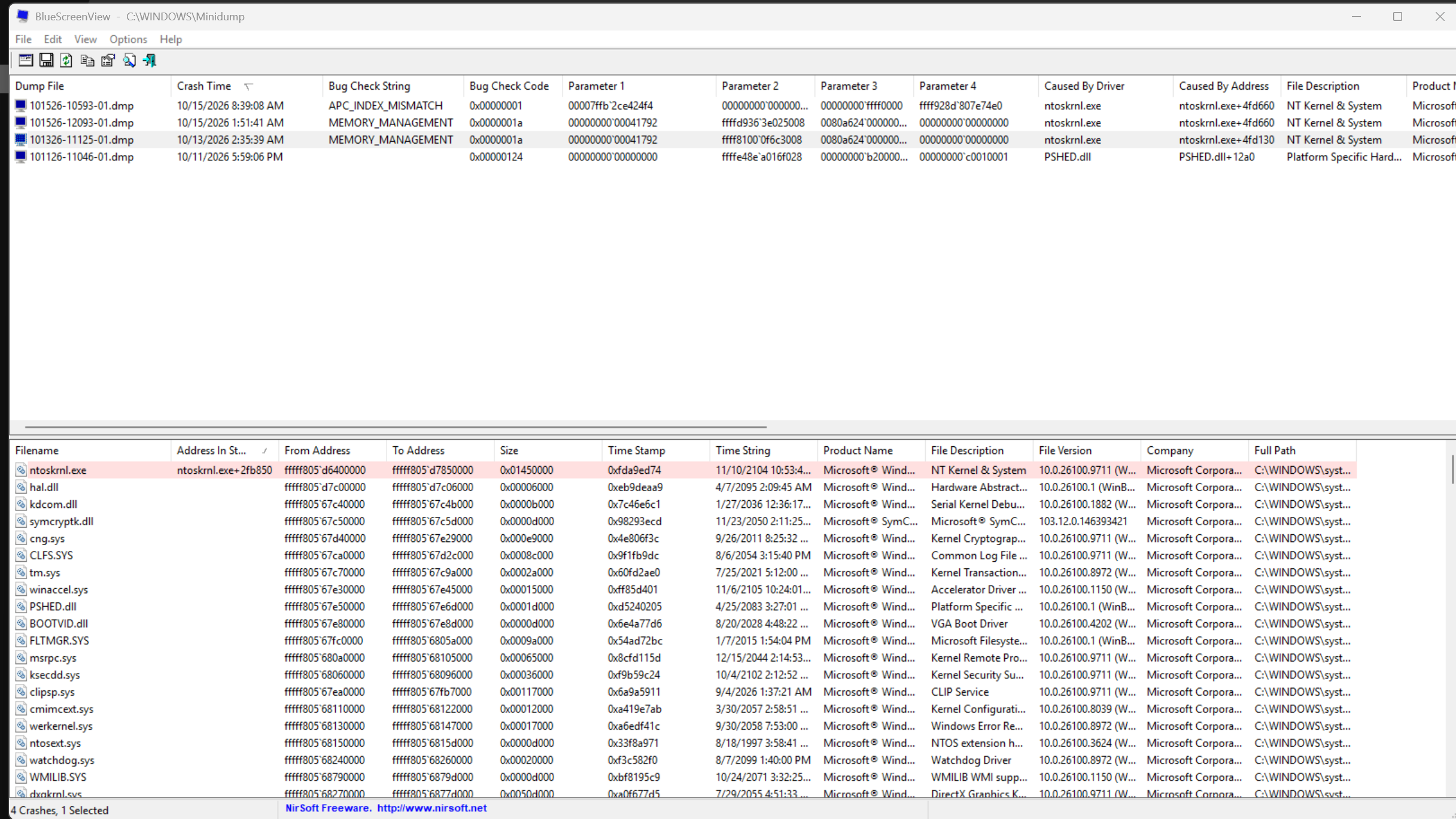
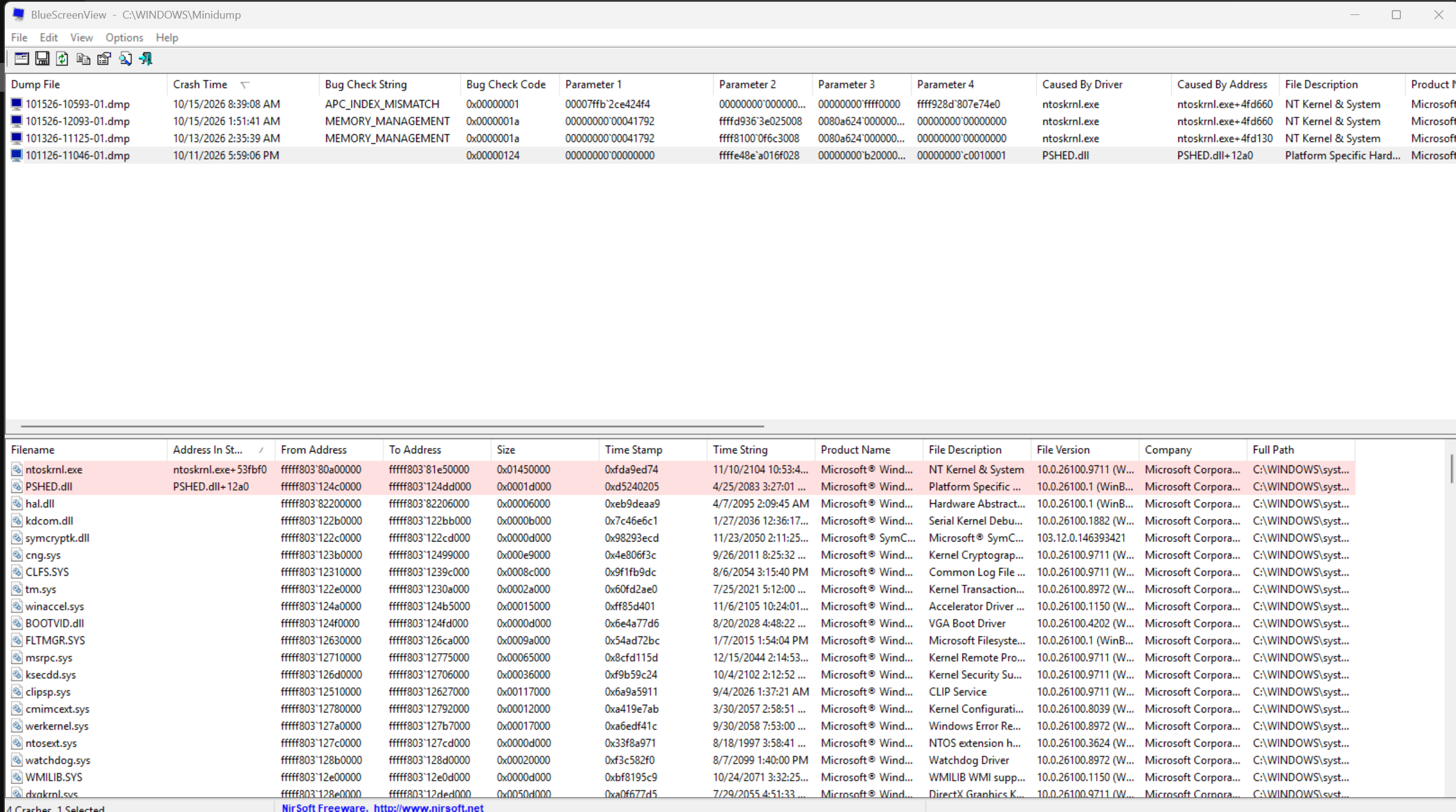
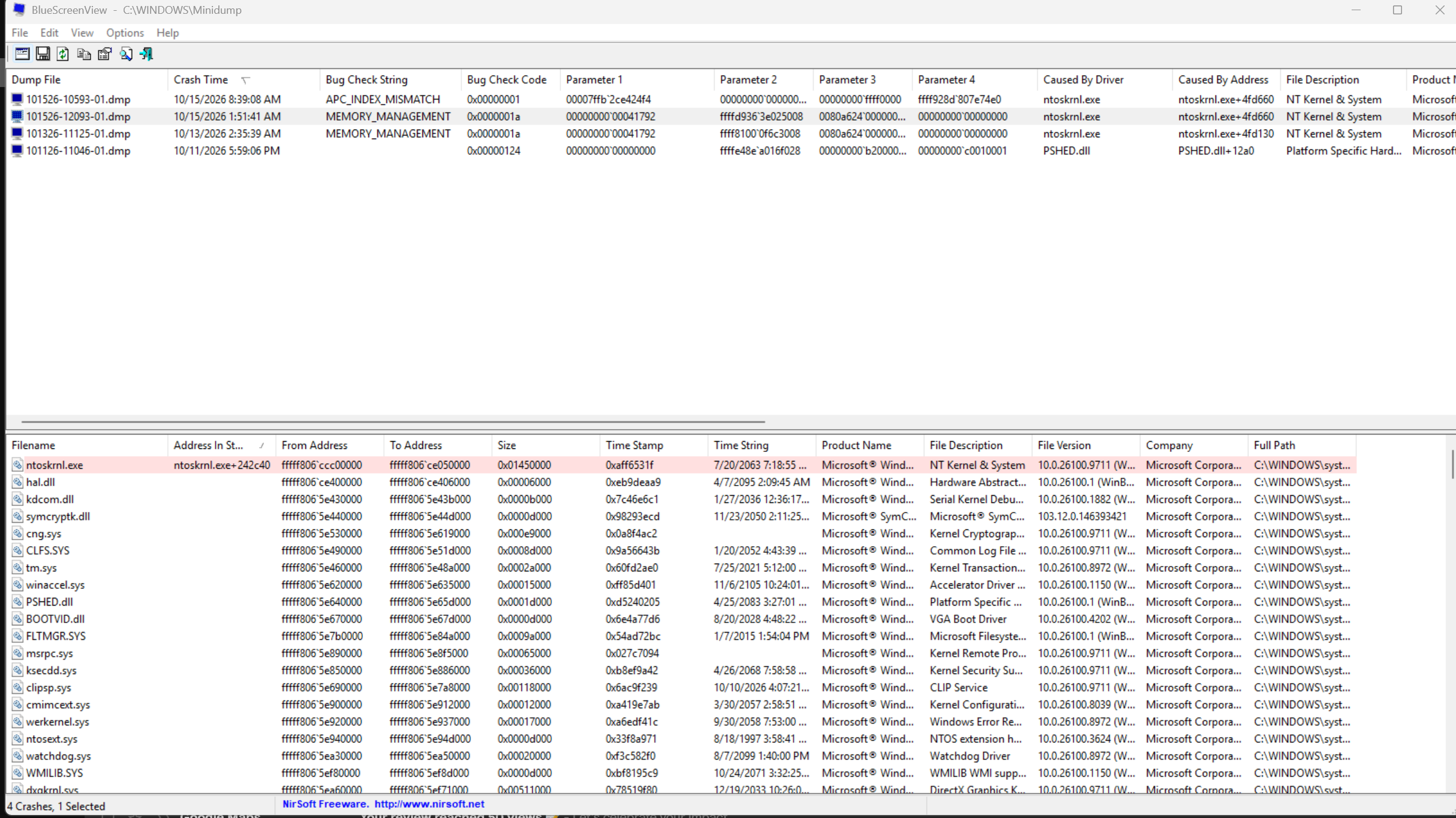
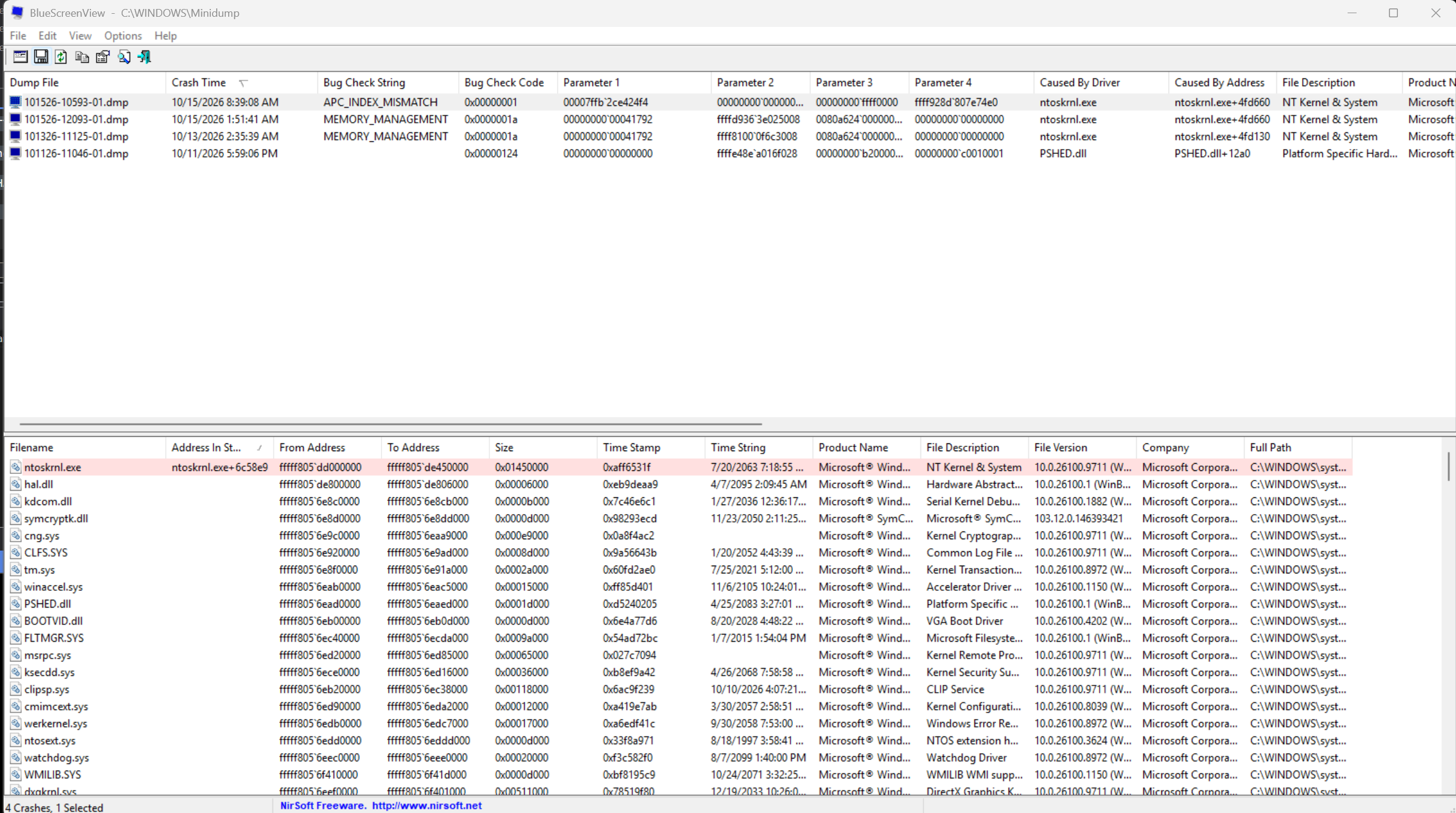
@PowerSpec_MikeW G916 new build blue screening while idle on windows, blue screen viewer shows memory_management as the blue screen code. Ran memtest86 , passed on 4 runs. This is the second G916 build I’ve had to do this. I exchanged the last one. Tried EXPO on and off, same blue screen. I tried turning off C states, usb selective suspend, etc. I’m thinking it needs a new bios version, the newest official bios from MSI is older than the one I’m on so is it just not stable bios release or what? The cost of this build went up $3,000 in one week so I really don’t want to return it but if they are all going to crash like this, it’s not even worth keeping.
-
The BIOS is based on 2A52, their latest. We have them customize it by adding our splash and enabling PXE for production. That's why the date is a little later than their release. Could you run bluescreenview and post a screenshot so that we can see all the BSOD's?
Also there's a button on the PSU labeled Zero RPM fan mode. Make sure that's toggled off, it should be out.
-
@PowerSpec_MikeW Attached are the blue screen logs, I can't last more than 4 hours idling on windows. I always try and test overnight and when I wake up its always back on the windows log in screen. I've also just pressed the Zero RPM fan button, it was definitely pressed in so I think its off now. This is every bluescreen since I picked up the exchanged unit on Friday.
-
Random crashes, nothing driver wise or OS wise to glean from that. Let me know if there's a change after disabling the zero RPM fan mode. I don't trust this, and our builds are instructed to disable this, but some times the EP foam can press it in during pack out.
-
Looking for bios for G731 - current one I have is 1.A01, 7/24/2025. Lots of sleep/wake issues. Thanks!
-
-
Temps for everything including Core and GPU temps float between 35-53. I had a local micro center run tests. They could not reproduce the crashing. The stated the fixed some corrupted files. I am still having issues with it randomly crashing, I even recorded it. Game slightly froze for a second then crashed, no errors. Only happening with BF6. I currently only play wow and BF6, so I have not tested it on other games.
-
Alright. Disable EXPO in the BIOS and see if the issue persists.
-
G762 (ASRock X870 Pro-A WiFi, 4.03.MS02): onboard 2.5GbE lost after sleep, only a reboot restores it
System
- PowerSpec G762, SKU 974881, purchased Oct 18, 2026
- Board: ASRock X870 Pro-A WiFi, BIOS 4.03.MS02
- CPU: Ryzen 7 9850X3D; RAM: 2x32GB DDR5 at 6000 (EXPO)
- LAN: Realtek Gaming 2.5GbE (RTL8125); Wi-Fi: Realtek 8922AE WiFi 7
- Windows 11
Issue
After the PC resumes from sleep, the onboard Ethernet comes back "Not operational" with no link. Reseating the cable does nothing; only a reboot restores it. Short sleeps sometimes recover after a brief drop, but longer sleeps fail consistently. On one occasion both onboard Realtek devices (LAN and Wi-Fi) disappeared from Device Manager entirely until reboot. Cold boots and restarts are always fine. Reproduced on two different networks and routers.Already tried
- PCI Express Link State Power Management: Off
- "Allow the computer to turn off this device": unchecked (LAN and Wi-Fi)
- Energy-Efficient Ethernet, Advanced EEE, Green Ethernet, Power Saving Mode, Gigabit Lite: all disabled
- BIOS Deep Sleep / ASPM settings reviewed
- Fast Startup off
Questions
- Is there a newer MS build than 4.03.MS02 for this board, and does it address LAN/PCIe devices not resuming from sleep?
- If not, is ASRock's retail 4.60 (AGESA 1.3.0.1d) safe to flash on the G762, and what would I lose by doing so?
- Is this a known issue on this platform? I've seen the same symptom reported on other ASRock X870 boards.
I'm inside the return window, so any guidance on whether this is fixable in firmware or warrants an exchange would be appreciated. Thanks.
-
- Not at this time, but we can work on it. I've not been able to replicate this issue in the lab.
- It'll work fine, you won't receive our driver updates, as the board will revert to ASRock as the manufacturer. That might be better for now, because I'd ask you to delete the NIC driver and see if you replicate it with the inbox driver.
- I haven't seen an issue like this. We'll talk to ASRock.
-
Hi! I'm looking for an updated BIOS for the G901 build. Thanks!
-
Latest is 4010.
-
Thanks for the answer!
That 4010 build is more than 5 years old and is the version that came with the computer. If I'm trying to run the latest Modern Warfare, the game won't run without a BIOS update even though the TPM/SecureBoot passes muster.
I just want to be sure - the 901 is a dead end for MW4 even though it has the appropriate mobo components? Or is there a way to make it work with the 4010 build?
-
I'd recommend the latest BIOS from ASUS. Main change would be that it won't be a PowerSpec in the BIOS for driver updates, but this model is past the point where we would be qualifying new driver sets.
-
I thought about doing that, what do you think the chances are that it would brick the whole thing?
-
Hello! I would like to request the recent file for the BIOS firmware update. It's a Power Spec G518 B550M-C.
-
G911: If upgrading BIOS from 2A04 to 2A06, do you need to update to 2A05 first?


Leave a Comment
Categories
- All Categories
- 1 The Blog
- 1 What's Trending
- 8.2K The Community
- 3.3K General Discussion
- 153 New Members
- 896 Consumer Tech
- 248 Prebuilt PCs and Laptops
- 171 Software
- 33 Audio/Visual
- 54 Networking & Security
- 4 Home Automation
- 5 Digital Photography
- 14 Content Creators
- 30 Hobby Boards & Projects
- 85 3D Printing
- 84 Retro Arcade/Gaming
- 64 All Other Tech
- 520 PowerSpec
- 2.7K Store Information and Policy
- 156 Off Topic
- 70 Community Ideas & Feedback
- 620 Your Completed Builds
- 4.1K Build-Your-Own PC
- 3K Help Choosing Parts
- 329 Graphics Cards
- 339 CPUs, Memory, and Motherboards
- 146 Cases and Power Supplies
- 54 Air and Liquid Cooling
- 51 Monitors and Displays
- 94 Peripherals
- 71 All Other Parts
- 65 Featured Categories
We love seeing what our customers build
Submit photos and a description of your PC to our build showcase
Submit NowLooking for a little inspiration?
See other custom PC builds and get some ideas for what can be done
View Build ShowcaseSAME DAY CUSTOM BUILD SERVICE
If You Can Dream it, We Can Build it.
Services starting at $149.99