
PowerSpec BIOS Requests and Questions - AMD
Comments
-
Hi, can you please link the latest bios update for an MSI Pro Z690-A Wifi? I'm currently on E7D25IZ1.AMI
Thank you!
-
Subject: PowerSpec G717 – BIOS Update Request and DDR5 Memory Stability Issues
Hello PowerSpec Support Team,
I own a PowerSpec G717 Gaming PC purchased from Micro Center, and I am requesting assistance with a compatible BIOS update and an ongoing memory stability issue.
System Specifications:
- PC Model: PowerSpec G717
- System Manufacturer: Micro Electronics
- Motherboard: MSI PRO B650-VC WIFI (MS-7D78)
- CPU: AMD Ryzen 7 7800X3D
- RAM: 32GB (2 × 16GB) G.Skill DDR5-5600
- RAM Part Number: F5-5600J3636C16G
- Current RAM Speed: DDR5-4800 (XMP disabled)
- GPU: NVIDIA GeForce RTX 5070 Ti
- Operating System: Windows 11 Pro
Current BIOS Information:
- BIOS Version: 1.ME
- BIOS Identifier: E7D78AZ1.1ME
- BIOS Date: March 1, 2024
- AMD AGESA Version: ComboAM5PI 1.1.0.1
Issue Description:
My computer has been experiencing memory-related errors and occasional unexpected restarts.
I have already performed several diagnostic tests:
- MemTest86 reported 4 errors and failed after approximately 3 hours and 21 minutes.
- Windows Memory Diagnostic also reported memory errors.
- The issue persists with XMP disabled and RAM running at DDR5-4800.
- Both RAM modules were tested individually in slot A2 without errors during those tests.
- Memory testing involving slot B2 produced errors.
- Testing both modules together in slots A2 and B2 also resulted in errors.
- CMOS has already been cleared.
- Windows recently experienced a Blue Screen with bug check code 0x1A (MEMORY_MANAGEMENT), associated with nt!MiGetPageProtection.
The system generally operates normally during everyday use and gaming, but diagnostic testing and occasional restarts indicate a potential memory subsystem stability problem.
My Questions:
- Is there a newer official PowerSpec-compatible BIOS available for the G717 with motherboard MS-7D78 and BIOS identifier E7D78AZ1.1ME?
- If available, could you provide the correct BIOS file and official installation instructions?
- Is it safe to use a standard MSI BIOS for this motherboard, or must I use a PowerSpec-specific OEM BIOS?
- Could a BIOS/AGESA update potentially address these memory errors?
- Based on the diagnostic results, would you recommend additional testing of the motherboard, memory channel B, or CPU memory controller before updating the BIOS?
I want to ensure that I install only the correct and officially supported firmware, especially because the system has experienced unexpected restarts.
Thank you for your time and assistance.
Best regards
-
-
-
- That's our latest.
- .
- Yes, you can flash the MSI BIOS. Main change it it will not automatically download drivers posted by us.
- It could, it could also make the problem worse.
- Both modules passed in A2 but failed in B2? In memtest86 which tests failed?
-
@PowerSpec_MikeW Thank you so much! What are the steps to Instant flash the BIOS firmware update, it's my first time.
-
Depends on the board. MSI requires the Control + Alt + T advanced flash menu. All other boards are just normal flash procedures.
-
@PowerSpec_MikeW
My board is the ASRock B550M-C. Currently I am running into a problem where I do the steps correctly but I run into a "No image File Detected". I'm honestly lost -
That means it's not detecting the BIOS file. Make sure it's not in a zip folder, extract the file onto the flash drive.
-
that seemed to have fixed the issues thus far! Thank you!
-
Hello, I have a PowerSpec desktop with an ASRock B550M-C motherboard and an AMD Ryzen 7 3700x CPU. My current BIOS is on version P1.40. I am running into the infinite boot loop bug whenever I try to turn on Secure Boot. Could you please provide the download link for the updated custom PowerSpec BIOS file to fix this?
-
@PowerSpec_MikeW Hey, I did what you told me and I'm still having issues. But could it be because I have noticed in BIOS my UEFI BIOS Version is B550M-C L3.46?
-
There's a link in this thread:
-
Newer AGESA may not allow it rollback. Try the latest 4.0 from ASRock:
-
@PowerSpec_MikeW It worked perfectly, Thank you so much for your time! 😊
-
I wanted to follow up and share the final resolution regarding the persistent kernel heap crashes (0x7e) and WHEA idle errors I was experiencing with my PowerSpec build (Ryzen 9 9950X3D, RTX 5090, and 64GB DDR5).
I tried your suggestion of disabling the zero RPM fan mode, as well as testing a few other tweaks on my end like turning off C-states and changing the PSU idle power settings in the BIOS, but unfortunately, none of those fixes ended up working. The system remained perfectly stable under heavy load, but continued to crash consistently when left at idle, even when I completely disabled EXPO and ran the memory at base stock speeds.
After extensive troubleshooting, the root cause ultimately came down to the factory MSI Pro motherboard. The board's topology simply could not maintain stable signaling with the high-density 64GB kit, which caused those memory decommit conflicts during idle states.
To fix it, I swapped the motherboard for a Gigabyte X870E AORUS ELITE X3D. The premium 8-layer PCB on the Gigabyte board immediately resolved the signaling bottlenecks, and the system is now running flawlessly with the 64GB EXPO 1 profile fully enabled with zero kernel crashes or idle instability.
Since the G916 is now retailing for $8,999 (which is over $3,000 more than when I bought mine just a month ago!), it might be worth passing this along to the product team. If they are going to continue pairing top-tier AMD chips with 64GB memory kits at that premium price point, upgrading the default motherboard to something with a stronger memory topology would probably save a lot of future headaches.
The system is now a rock-solid powerhouse. Thanks for the help along the way!
-
There's a lot of factors that play into it. Motherboard (VRM, independent phases), binning to include the RAM kit and IMC. Instability at idle due to RAM is interesting, and may come down to being an issue with how features like powerdown enable are handled, in combination with specific bins. We test it in house on a number of machines, but all these factors change over time. We'll look into it and we appreciate the information.
-
Thank you
-
Hey PowerSpec Team!
I've been having recurring stability issues with my PowerSpec G759 and wanted to get your input.System:
- PowerSpec G759
- AMD Ryzen 7 9800X3D
- ASRock X870 Pro-A WiFi
- 64GB DDR5 RAM
- BIOS updated from 3.50.MS02 to 4.10.MS01
The PC randomly freezes completely, sometimes with the audio getting stuck in a loop. There's no BSOD, and I have to hold the power button to restart it.
When this first started happening a couple of months ago, I reset the BIOS to defaults and re-enabled EXPO. That seemed to resolve the issue for about two months, but the same crashes recently returned.
I was able to update to the latest PowerSpec BIOS (4.10.MS01) using USB BIOS Flashback. I've also disabled EXPO as of last night to see whether that makes a difference.
I'm starting to suspect memory instability related to EXPO, although I haven't confirmed that yet.
A few questions:
- Have you seen similar stability issues with the G759 and its factory RAM configuration?
- Are there any recommended manual memory settings, such as frequency, timings, or voltages, that you've validated for this system?
- Are there any BIOS settings, such as Memory Context Restore, that you recommend adjusting?
- Since this system shipped with EXPO enabled, would this be considered a warranty issue if the instability turns out to be memory-related?
I'd appreciate any recommendations before I start changing additional settings.
Thanks!
-
We have not, but with binning it's always a possibility. Along with general hardware failures. Generally memory errors produce BSOD's, where as drive failures are more likely to produce a freeze as you're describing. Best course is memtestx86 overnight, 4 passes. It's a simple test and will rule out RAM or give us more information to work with. If it fails, we need to know which tests failed and a screenshot of Zentimings would be helpful.
-
I have a new PowerSpec G762 (SKU 974881) and would like the latest BIOS for it to see if it might help me at all.
System:
- Ryzen 7 9850X3D
- ASRock X870 Pro-A WiFi,
- G.Skill F5-6000J3848D32G, 2x32GB
- PNY RTX 5080
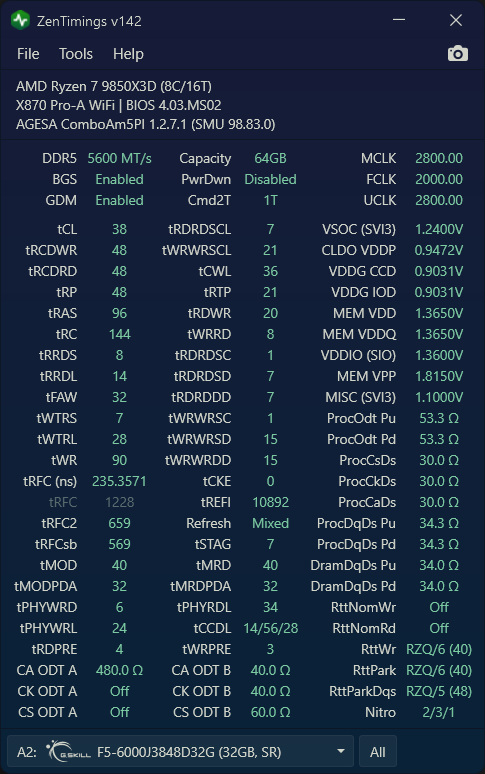
The system shipped with EXPO 6000 enabled and has been crashing with memory-related issues (PFN_LIST_CORRUPT, IRQL_NOT_LESS_OR_EQUAL, KMODE_EXCEPTION_NOT_HANDLED, ATTEMPTED_EXECUTE_OF_NOEXECUTE_MEMORY, VIDEO_DXGKRNL_FATAL_ERROR). Currently stable at 5600 but OCCT and TestMem5 fail at 6000 and 5800.
-
Test 5 usually says IMC instability. Can you post a Zentimings screenshot? I'll post the BIOS in the morning.
-
Load the 6000MHz profile. Then lets do VDD = 0.90, VSOC = 1.25, VDDIO = 1.35 = PowerDown Enable = Enabled. Take a zentimings screenshot and test.
-
Thanks! Will try that and get back to you.
What I've tried so far:
- BIOS: ASRock retail 4.60 (AGESA 1.3.0.1d)
- 5600 CL36 : stable OCCT + TestMem5
- MemTest86 at 6000: no errors (2 passes)
- 6000 EXPO as shipped: OCCT/TestMem5 fail within 1–3 min on both BIOS versions
- 6000 + DRAM VDD/VDDQ 1.35–1.40V, VDDIO 1.30–1.35V, SoC 1.25–1.28V: still fails OCCT/TestMem in ~2 min
- FCLK 1800/1900/2000: no difference
Tried messing with the AMD Curve Optimizer with some better results.
- 6000 + positive Curve Optimizer at +5 lasted 16 min OCCT, +15 lasted 8 min OCCT
- 5800 CL36, FCLK 2000, SoC 1.265V, DRAM 1.40V, VDDIO 1.35V, CO +10: passed 1 hr OCCT + TestMem5 (Most stable I have gotten so far)
-
@PowerSpec_MikeW
Thanks, that worked! VDDP might have done something? BIOS 4.60 had auto-set it to 1.15V.- Power Down Enabled in both AMD CBS and AMD Overclocking (ZenTimings still reads PwrDwn Disabled, though)
- Curve Optimizer All Cores +10 was also on, since it seemed to help earlier. I haven't tested without it yet.
Results:
- OCCT Memory 1 hr: 0 errors (first full pass at 6000; earlier runs crashed in 2–16 min)
- TestMem5: 0 errors
ZenTimings screenshot attached. Is it worth keeping the CO +10, or should I try without it? And any idea why PwrDwn reads Disabled?
Tried gaming on it today, no issues so far.Thanks again for the help!
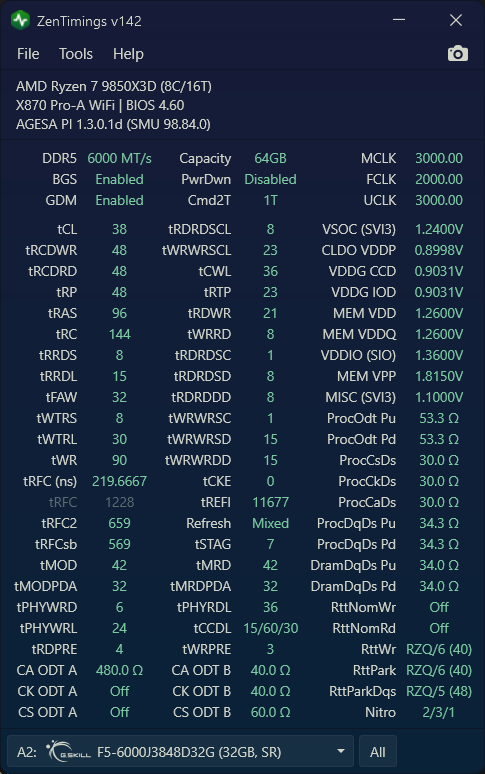
-
Keep an eye on it. Motherboard vendors tend to run 1.15V which is absurdly high. Should be 0.90-0.95mV max.
-
@PowerSpec_MikeW
Looks like it was doing good on some other games until I opened up COD on high settings, caused a freeze and restart twice within 5ish minutes of playing the game. Kept everything the same but dropped speed to 5800 seems to be okay now. Anything else I should try to try and get it stable at 6000? -
G762: BIOS 4.60 causes BSODs within minutes, stable on 4.03. Is there a newer PowerSpec build?
I just got my G762 yesterday.
System:
- ASRock X870 Pro-A WiFi
- Ryzen 7 9850X3D
- 64GB (2x32GB) g.skill trident DDR5-6000 , EXPO
- Zotac Gaming RTX 5080
- Windows 11 Home
What happened:
- It shipped on BIOS 4.03.MS02 (dated 1/20/2026) and appeared to be completely stable with EXPO at 6000 over the first several hours of use.
- I flashed ASRock’s latest public BIOS, 4.60 (AGESA ComboAM5 1.3.0.1d), with Instant Flash.
- On 4.60, it went from stable to a BSOD about a minute after every boot. That held with EXPO off at stock 5600 / 1.10V, and even in Safe Mode.
- I got 5 crashes in about 23 minutes, all different:
- PAGE_FAULT_IN_NONPAGED_AREA (0x50) x3, faulting in ntoskrnl, vgk.sys and Ntfs.sys
- PFN_LIST_CORRUPT (0x4E)
- DRIVER_IRQL_NOT_LESS_OR_EQUAL (0xD1) in ACPI.sys
- The crashes also corrupted system files (d3d11.dll, win32spl.dll and others), so I had to do an in-place Windows repair.
What fixed it:
- I used BIOS Flashback to load ASRock’s stock 4.03. That’s the same base version, but not the MS02 build, which isn’t available publicly.
- It’s been rock solid since: chkdsk clean, sfc clean, EXPO 6000 back on, Secure Boot on.
Questions:
- Is there a newer PowerSpec/MS BIOS build for the G762 than 4.03.MS02? Or can I get the original 4.03.MS02 file?
- Is ASRock 4.60 a known issue on this platform, and is there a version you’ve validated as safe to update to?
-
Hi @PowerSpec_MikeW,
I have a PowerSpec G513 with an ASRock B550M-C motherboard and AMD Ryzen 5 5600X.
My current BIOS is P1.40B dated 6/27/2022, and my AMD TPM firmware is 3.77.0.5.
Call of Duty's Secure Attestation Wizard reports that a BIOS firmware update is required. UEFI and Secure Boot are both enabled.
Could you please provide the latest PowerSpec-approved BIOS update for the G513?
I haven't been able to locate a G513-specific BIOS download.
Thank you!




Leave a Comment
Categories
- All Categories
- 1 The Blog
- 1 What's Trending
- 8.2K The Community
- 3.3K General Discussion
- 153 New Members
- 896 Consumer Tech
- 248 Prebuilt PCs and Laptops
- 171 Software
- 33 Audio/Visual
- 54 Networking & Security
- 4 Home Automation
- 5 Digital Photography
- 14 Content Creators
- 30 Hobby Boards & Projects
- 85 3D Printing
- 84 Retro Arcade/Gaming
- 64 All Other Tech
- 520 PowerSpec
- 2.7K Store Information and Policy
- 156 Off Topic
- 70 Community Ideas & Feedback
- 620 Your Completed Builds
- 4.1K Build-Your-Own PC
- 3K Help Choosing Parts
- 329 Graphics Cards
- 339 CPUs, Memory, and Motherboards
- 146 Cases and Power Supplies
- 54 Air and Liquid Cooling
- 51 Monitors and Displays
- 94 Peripherals
- 71 All Other Parts
- 65 Featured Categories
We love seeing what our customers build
Submit photos and a description of your PC to our build showcase
Submit NowLooking for a little inspiration?
See other custom PC builds and get some ideas for what can be done
View Build ShowcaseSAME DAY CUSTOM BUILD SERVICE
If You Can Dream it, We Can Build it.
Services starting at $149.99