
PowerSpec BIOS Requests and Questions - AMD
Comments
-
@PowerSpec_MikeW
I enabled EXPO and applied those settings. The PC immediately went into BSOD on start-up with memory-related errorsATTEMPTED_WRITE_TO_READONLY_MEMORY,IRQL_NOT_LESS_OR_EQUAL, andMEMORY_MANAGEMENT. After trying to boot 3 times I reverted the settings and can start the PC again. -
Why do so many people insist on changing the bios. i have had F5a GA2 since January of this year, and no problems.
-
Did those changes exacerbate the problem? Or is this consistent with having EXPO enabled?
-
I'll flash a BIOS on a new build as a starting point. Otherwise, I'm not touching it unless I need to for some specific fix. Not worth potentially creating instability and having to dial in my overclocks again.
-
Those changes exacerbated the problem. The PC wouldn't even start with those settings, without those settings it runs but randomly will crash.
-
Please provide a Zentimings screenshot with EXPO loaded.
-
I can't run Zentimings with EXPO loaded because the computer crashes when booting.
-
Alright, so you're severely unstable. So when you mentioned running memtestx86 was that on JEDEC? If so, can you get into Memtestx86 with one stick installed? I'd like to see if one of the RAM modules is at fault here.
-
Yes I ran MemTest86 on JEDEC. Are you asking to try with EXPO enabled on each stick individually?
-
Yes, I'd like to see if one of the modules is responsible.
-
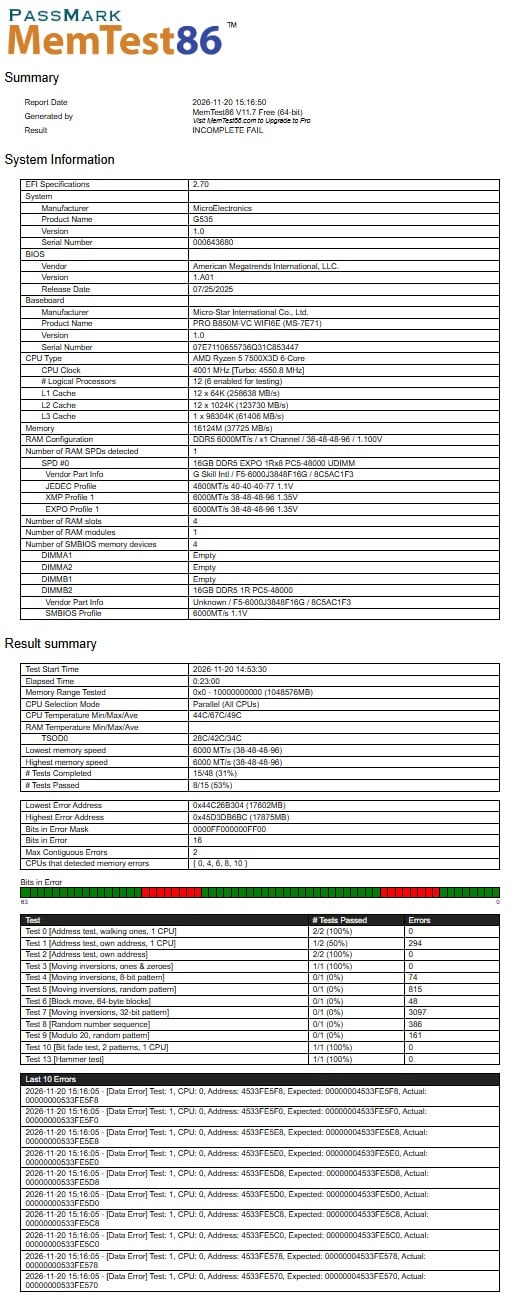
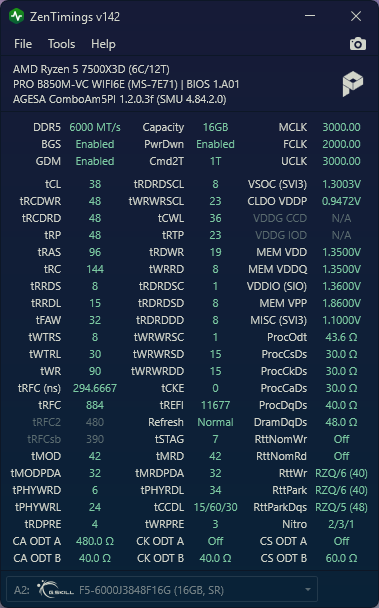
Ok I ran MemTest86 on EXPO. One stick of RAM was good. The other had numerous errors. I've uploaded the report. I took out the bad stick and am only running with with the good one for now on EXPO and it seems to be stable. Also here's a Zentimings screenshot of running on EXPO with just the single RAM.
-
Confirms the issue is a failed RAM stick. I would visit the store for a replacement.
-
BIOS Update Request for PowerSpec B247 (Current Version P1.70C)
I am trying to update the BIOS on my PowerSpec B247 desktop, but standard retail ASRock flash tools and BIOS files are blocked on this system.
My current BIOS version from
msinfo32is P1.70C (dated 6/10/2021). Could you please provide the correct vendor BIOS update package and flashing instructions for the PowerSpec B247 motherboard?Thank you!
-
This model is beyond our support window. I would recommend the latest BIOS from ASRock:
There installation method is the same. Copy the file to a flash drive, boot into the BIOS. On the Tools tab, the BIOS flash tool auto scans for the BIOS file.
-
Hi @PowerSpec_MikeW
just following up to see if the new1A93-based BIOS for the PowerSpec G756 (MS-7E47/ currently onE7E47AM70.1A04) is ready yet! Also, once it's up, should I useCtrl + Alt + Tin Click BIOS X from a FAT32 USB drive or the rear Flash BIOS Button (MSI.ROM) to install it? Thanks again!
-
Internal testing has passed, we're waiting on a customized BIOS from MSI.
-


Leave a Comment
Categories
- All Categories
- 1 The Blog
- 1 What's Trending
- 8.2K The Community
- 3.3K General Discussion
- 153 New Members
- 896 Consumer Tech
- 248 Prebuilt PCs and Laptops
- 171 Software
- 33 Audio/Visual
- 54 Networking & Security
- 4 Home Automation
- 5 Digital Photography
- 14 Content Creators
- 30 Hobby Boards & Projects
- 85 3D Printing
- 84 Retro Arcade/Gaming
- 64 All Other Tech
- 520 PowerSpec
- 2.7K Store Information and Policy
- 156 Off Topic
- 70 Community Ideas & Feedback
- 620 Your Completed Builds
- 4.1K Build-Your-Own PC
- 3K Help Choosing Parts
- 329 Graphics Cards
- 339 CPUs, Memory, and Motherboards
- 146 Cases and Power Supplies
- 54 Air and Liquid Cooling
- 51 Monitors and Displays
- 94 Peripherals
- 71 All Other Parts
- 65 Featured Categories
We love seeing what our customers build
Submit photos and a description of your PC to our build showcase
Submit NowLooking for a little inspiration?
See other custom PC builds and get some ideas for what can be done
View Build ShowcaseSAME DAY CUSTOM BUILD SERVICE
If You Can Dream it, We Can Build it.
Services starting at $149.99