
PowerSpec BIOS Requests and Questions - Intel
Comments
-
VDIMM should be changing when you load XMP. Did you enable it in the easy or advanced menu? Screenshot what you're seeing.
-
quick question. I have a powerspec g478 which comes with the MSI MPG Z790 EDGE WIFI motherboard. I have the powerspec bios update that was posted in this thread from back in like november. I decided to try to do some undervolting on the CPU to try to reduce the temps since I noticed the CPU was over heating. but I couldn't really get it to not crash on me so I switched the mode from offset by CPU back to auto, and since then the problems have progressively gotten worse and I am now getting random crashes.
I guess this is just a long winded way of asking if there is a way to revert the bios back to the powerspec defaults? or do i need to re flash the update from november? or is there a newer bios that I may be missing? I fear that maybe I didnt put everything back the way it was before I tried to undervolt and maybe that's why I am now getting the occasional crashes, or maybe it's the known degradation problem with 14th gen Intel CPUs.
Also, if i choose to continue to pursue the undervolt, do you have any tips for someone who's doing this for the first time? -
You can load defaults, the only significant changes we made on this BIOS was secure boot and running the maximum security mode.
That's a deep hole to get into. I'd check out SkatterBenchers guides for your CPU, they're pretty solid on undervolting.
-
Hi Mike, I’m trying to clarify something regarding the PowerSpec G478.
My G478 has an i9-14900K and MSI MPG Z790 EDGE WIFI (MS-7D91). I found your post where you provided E7D91IZ1HMB.7z for the Z790 EDGE WIFI and described it as the HMB BIOS.
Can you confirm whether E7D91IZ1HMB with 0x12F microcode is qualified for the G478 with the 14900K, or whether HMB was only qualified for other PowerSpec models using the same motherboard?
The G478 currently has HM9/0x12B, so I’m trying to determine whether HMB is intentionally excluded from the G478 or simply not listed on its support page.
Also, since I’m still experiencing occasional crashes on 0x12B, although less frequently, and those crashes originally led to my previous CPU replacement, should the CPU be replaced again under the same warranty coverage for the 13th/14th-gen Intel issue if the crashes continue after getting onto the appropriate 0x12F BIOS?
-
Yes, HMB has the 0x12F microcode. We released a BIOS with the latest microcode for all affected platforms.
Yes, if you're still experiencing crashes and believe the CPU is the main factor, I would check and see if the warranty is still active.
-
Hi! I have a PowerSpec G449 with an MSI PRO Z790-A MAX WIFI motherboard and an Intel Core i7-14700KF. My current BIOS date is March 29, 2024, and multiple games are telling me that I need to update my BIOS. I found the MSI PRO Z790-A MAX WIFI section in this thread, but I want to make sure I download the correct BIOS specifically for my PowerSpec G449. Could you please point me to the latest compatible BIOS update and let me know the recommended installation instructions for my system? Thank you!
-
Attached BIOS is based off of M7 with the 0x12B microcode.
-
I have a G478 and I was wondering what the most update BIOS version is and if you could provide me with a copy. I am playing the new Transport fever 3 game and I am encounter a large amount of errors and it looks like my version of BIOS may not have 0x12F or newer which is the cause per the developers. I think I am working on HM9 but I think that is 0x12b but maybe I am wrong (I truly have no idea what any of these means outside of what google says). I see someone mentioning something similar above but would love the actual file itself so I don't do something stupid. Any help would be greatly appreciated.
-
HMB is available which has the 0x12F Firmware. I'll upload it tomorrow and make sure it's available on the website.
-
@PowerSpec_MikeW Hello i have a g446, getting intel error code for 0x12f bios update any file for this?
BaseBoard Product PRO Z790-P WIFI (MS-7E06)
Processor Intel(R) Core(TM) i7-14700KF, 3400 Mhz, 20 Core(s), 28 Logical Processor(s)
-
AMJ attached. Use Control + Alt + T method in the BIOS.
-
@PowerSpec_MikeW trying now to extract to usb says this error each time
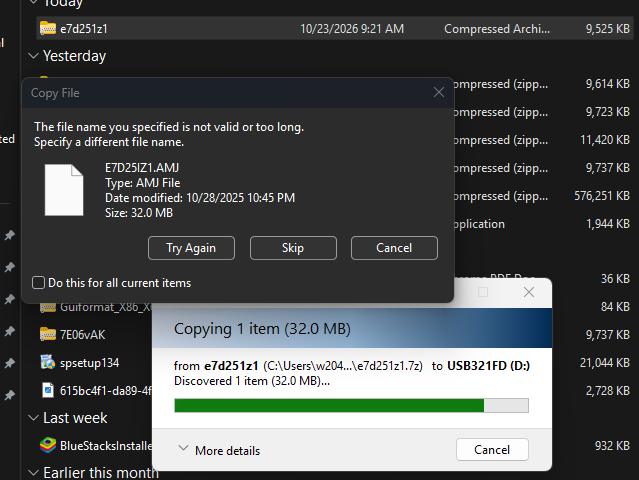
-
It's the temp file name. Extract the file to your downloads folder, then copy paste it onto the drive.
-
@PowerSpec_MikeW I have a G485 with MSI PRO z890-P wifi MS-7E34. Currently running bios 1.a07 with date of 4/2/2026. Is there a more recent one I should load? Thanks in advance.
-


Leave a Comment
Categories
- All Categories
- 1 The Blog
- 1 What's Trending
- 8.2K The Community
- 3.3K General Discussion
- 153 New Members
- 895 Consumer Tech
- 247 Prebuilt PCs and Laptops
- 171 Software
- 33 Audio/Visual
- 54 Networking & Security
- 4 Home Automation
- 5 Digital Photography
- 14 Content Creators
- 30 Hobby Boards & Projects
- 85 3D Printing
- 84 Retro Arcade/Gaming
- 64 All Other Tech
- 518 PowerSpec
- 2.7K Store Information and Policy
- 156 Off Topic
- 70 Community Ideas & Feedback
- 620 Your Completed Builds
- 4.1K Build-Your-Own PC
- 3K Help Choosing Parts
- 329 Graphics Cards
- 339 CPUs, Memory, and Motherboards
- 146 Cases and Power Supplies
- 54 Air and Liquid Cooling
- 51 Monitors and Displays
- 94 Peripherals
- 71 All Other Parts
- 65 Featured Categories
We love seeing what our customers build
Submit photos and a description of your PC to our build showcase
Submit NowLooking for a little inspiration?
See other custom PC builds and get some ideas for what can be done
View Build ShowcaseSAME DAY CUSTOM BUILD SERVICE
If You Can Dream it, We Can Build it.
Services starting at $149.99