
PowerSpec BIOS Requests and Questions - AMD
Comments
-
Hello,
I recently purchased a PowerSpec G914 and was in the process of setting everything up. During that process, I updated the BIOS firmware on my MSI MAG X870E-TOMAHAWK WIFI motherboard using the most recent version available on the MSI support site at https://www.msi.com/Motherboard/MAG-X870E-TOMAHAWK-WIFI/support (released January 30th). The update was successful and everything is currently working.
Afterwards, I learned that updating the BIOS wasn’t necessary and that for PowerSpec systems it’s generally recommended to use the BIOS firmware provided by Microcenter on their support page instead of the version from MSI’s site.
Is there a way for me to revert back to the original BIOS firmware or download current BIOS firmware for my PowerSpec prebuilt system? If so, could you please provide instructions or the correct file to use?
Thank you for your help.
-
@kolleb
That's correct, the first x16 is x16 lanes, the remaining 3 are electrically x1.
-
Attached our latest BIOS based on 2A95. From the BIOS press control + alt + t to enter advanced flash mode.
-
@PowerSpec_MikeW Thank you for your help. I noticed that the BIOS version you attached is for 2A95, however I downloaded the one from the MSI website listed as 2AA0. It was listed above. Is that okay? Once I in advanced flash mode, just click on the USB flash drive where I have the firmware on and begin the process of downloading it?
Also once it has finished installing, are there any settings in BIOS that I need to adjust? Update the ram speed, fan curves, etc?
-
I didn't see that BIOS. If you flash ours, just enable XMP/EXPO. Everything else is default.
-
@PowerSpec_MikeW Sounds good, thank you for confirming. Any risk of losing the windows license when doing this? Also, for Powerspec bios updates, should i just refer to the Powerspec website to see if there has been a new update added?
-
No risk to losing the license, it's in a protected area of the BIOS. If you did, we'd replace it under warranty anyways.
Check the website. If you want a BIOS just ping me here. Or if you're wondering if a BIOS would be helpful, I'll usually go over what's in the BIOS and if it's worth updating on our platforms.
-
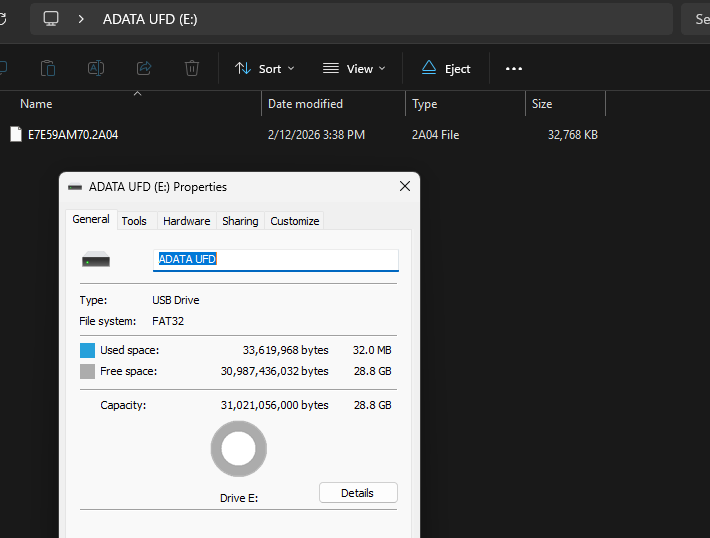
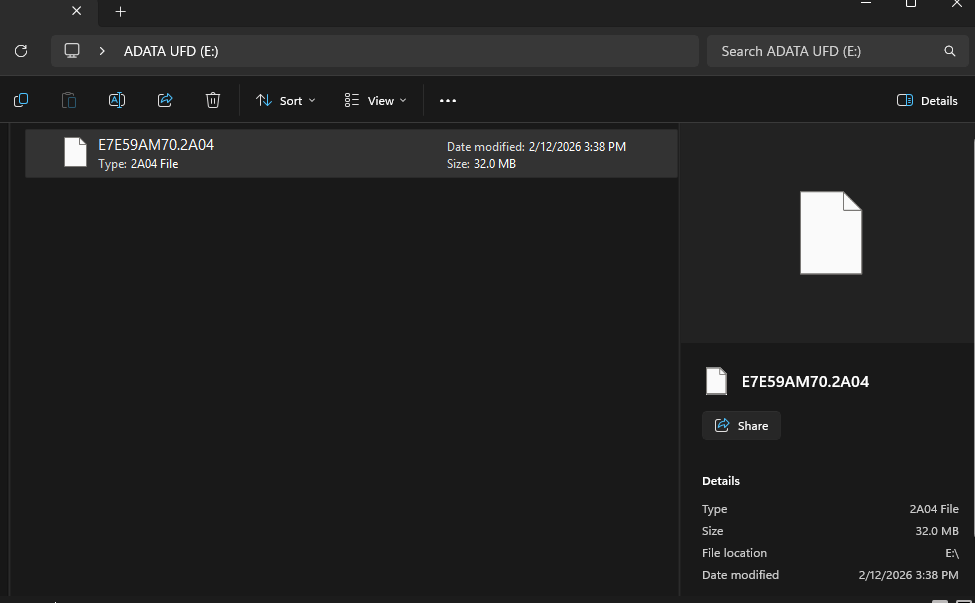
@PowerSpec_MikeW - any input on getting it to recognize the powerspec bios file again with Mflash? See original comment regarding MSI flash profile. Tried the latest 2A04 file and no luck. Thanks again.
-
Can you screenshot the file on your flash drive?
-
G911 here. What is the latest BIOS for it (where would that be?) and how do you disable HyperThreading. For AMD hyperthreading is referred to as SMT or Simultaneous Multithreading. This adds further stability for folks that play Digital Combat Simulator. EDIT: note the available 800 series BIOS manual from MSI shows where this setting is, but my BIOS (from July last year) doesn't have the same Overclocking setting menu. Very different in fact.
-
Attached. I don't have one setup right now, but typically MSI has a CPU menu under the overclocking menu for those settings. Let me know if you can't find it and I'll take a look.
-
@PowerSpec_MikeW, thanks for the two BIOS revisions. I have 2A02, so I'll upgrade to 04 (I don't need to do 03, first, do I?).
My BIOS 2A02 from last July had a couple of places to look based on the manual, but I did NOT see anything that says SMT or Simultaneous MultiThreading. I thought I looked around rather thoroughy in Advanced Mode but it just wasn't showing up in the list of options. Maybe they changed the name of the option. -
I'd like to see the contents in file explorer.
No, don't need to step it up. I'll check when I get a chance.
-
Advanced - AMD Overclocking - Manual CPU Overclocking - CPU Core count Control
-
@PowerSpec_MikeW Awesome, thanks for the responses.
-
Hi @PowerSpec_MikeW, would it be possible to get the latest BIOS for the PowerSpec G715? My Windows Event Viewer is showing issues due to this component not being up to do date. I appreciate your time and help!
-
Can we get an update for the G757 please? Its running f7 when f10 is the newest and with the 9800x3d cpus we need to make sure we have the latest so we dont risk burning out the cpus. Its showing its at f7 g12 but f9 can be downloaded even though f10 is the newest. Tried speaking to gigabyte and was told microcenter or powerspec needs to get the newest bios out to customers asap to risk no issues with the cpus burning out. Its a gigabyte b850 gaming wifi6. PLEASE HELP. Closest store to me is almost 3 hours away. Hard to make an almost 6 hour drive just for a bios update.
-
Same for the G706. Also, I cannot find my machine listed on the Powerspec site. Much obliged.
-
2.90B right now, I'm working on the latest, but it's still a work in progress.
-
Our latest was 2.60. What version are you on?
-
My version is currently at 1.30b
-
2.60C for the ASRock X570 Pro4.
-
Thanks Mike! I appreciate you.
edit: @PowerSpec_MikeW would you have an earlier version of the G715 BIOS you could send?
Since instant flash installing the 2.90B update, my PC is experiencing some sort of memory management failure and no longer functions properly.edit2: seems like I forgot to turn off the trusted computing when updating 🤦 so I’ll report back if the pc still is having issues after correcting that mistake and re installing the 2.90B updated BIOS.
-
Looks good. And you are entering advanced flash mode with Control + Alt + T from the BIOS?
-
Thanks!
-
What is E7E59AM70.2A04 based on? Just upgraded my G913 from E7E59AM70.2A02…
-
It's based on 2A95.
-
@PowerSpec_MikeW - all set now, thank you.





Leave a Comment
Categories
- All Categories
- 1 The Blog
- 1 What's Trending
- 8K The Community
- 3.2K General Discussion
- 145 New Members
- 872 Consumer Tech
- 233 Prebuilt PCs and Laptops
- 168 Software
- 33 Audio/Visual
- 54 Networking & Security
- 4 Home Automation
- 5 Digital Photography
- 14 Content Creators
- 30 Hobby Boards & Projects
- 84 3D Printing
- 83 Retro Arcade/Gaming
- 62 All Other Tech
- 429 PowerSpec
- 2.6K Store Information and Policy
- 150 Off Topic
- 61 Community Ideas & Feedback
- 616 Your Completed Builds
- 4K Build-Your-Own PC
- 2.9K Help Choosing Parts
- 328 Graphics Cards
- 334 CPUs, Memory, and Motherboards
- 145 Cases and Power Supplies
- 54 Air and Liquid Cooling
- 49 Monitors and Displays
- 93 Peripherals
- 69 All Other Parts
- 65 Featured Categories
We love seeing what our customers build
Submit photos and a description of your PC to our build showcase
Submit NowLooking for a little inspiration?
See other custom PC builds and get some ideas for what can be done
View Build ShowcaseSAME DAY CUSTOM BUILD SERVICE
If You Can Dream it, We Can Build it.

Services starting at $149.99